

Image Optimization
Tech Terms Daily – Image Optimization
Category — WEBSITE MAINTENANCE
By the WebSmarter.com Tech Tips Talk TV editorial team
1 | Why Today’s Word Matters
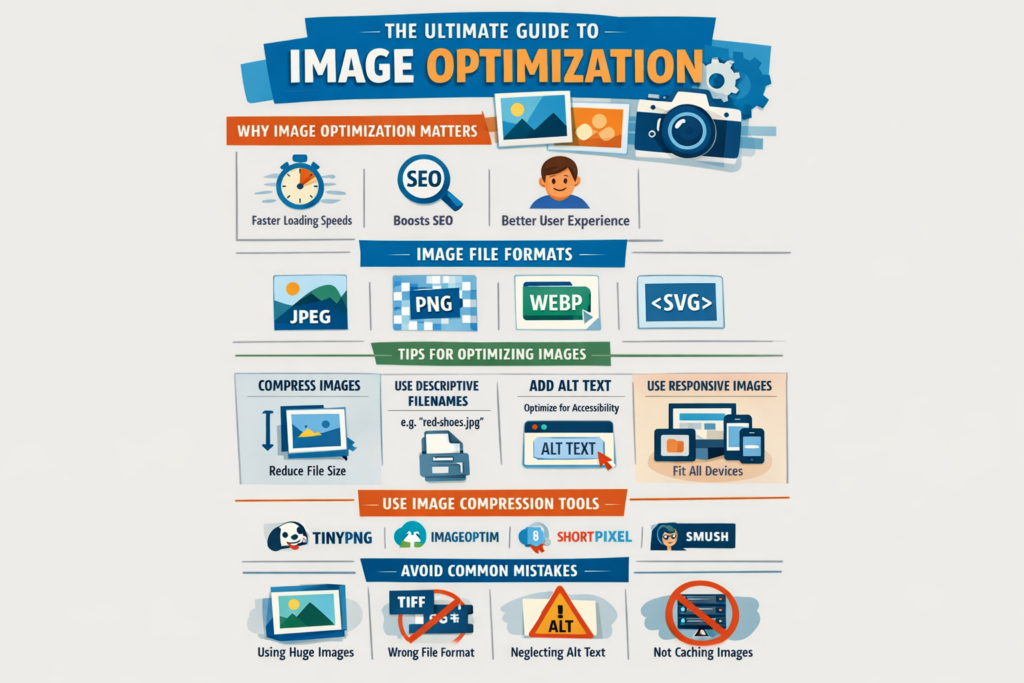
Images are the visual backbone of modern websites—grabbing attention, conveying brand personality, and enhancing user engagement. But while high-quality visuals can make your site look amazing, they can also silently sabotage performance if they aren’t properly optimized.
In 2025, Google’s Core Web Vitals and page speed benchmarks are directly tied to search rankings and user experience. According to Google research, 53% of mobile users abandon a site if it takes more than 3 seconds to load—and oversized, unoptimized images are often the main culprit.
Image optimization is not just about making files smaller; it’s about balancing visual quality with loading speed, ensuring your site stays fast, responsive, and search-engine friendly. Done right, it can boost SEO, improve conversion rates, and keep visitors engaged. Neglect it, and you’ll risk higher bounce rates, lost revenue, and lower rankings.
2 | Definition in 30 Seconds
Image Optimization (Website Maintenance):
The process of adjusting and compressing image files to reduce their size without sacrificing visual quality, improving website loading times, performance, and search engine visibility.
It answers four critical questions:
- Are images loading quickly without looking blurry or pixelated?
- Are file formats and sizes appropriate for their use?
- Are images responsive to different devices and screen sizes?
- Are alt tags and metadata optimized for SEO and accessibility?
Think of image optimization as tuning the engine of your website’s visuals—keeping them powerful, efficient, and user-friendly.
3 | Why Image Optimization Is Essential
| Without Optimization | With Optimization |
| Slow page load speeds | Faster, smoother browsing |
| Higher bounce rates | Lower abandonment, better engagement |
| Poor search rankings | SEO boost through better performance |
| Wasted bandwidth | Efficient use of hosting resources |
| Inconsistent mobile experience | Responsive images for all screen sizes |
4 | Key Elements of Image Optimization
- File Format Selection – Choose the best format for the job:
- JPEG for photos (smaller size, good quality)
- PNG for transparent backgrounds
- WebP/AVIF for modern, highly compressed, high-quality visuals
- JPEG for photos (smaller size, good quality)
- Compression – Reduce file size while keeping quality acceptable.
- Responsive Images – Serve different sizes for desktop, tablet, and mobile.
- Alt Text – Add descriptive text for SEO and accessibility.
- Lazy Loading – Load images only when they are about to appear in the user’s viewport.
5 | Five-Step Blueprint for Image Optimization Success
- Audit Your Existing Images
Identify oversized files, outdated formats, and missing alt tags. - Choose the Right Tools
Use optimization software or plugins to automate compression and resizing. - Compress Before Uploading
Always reduce size before adding to your CMS to avoid bloating the server. - Implement Responsive Delivery
Use HTML srcset or a CDN that serves device-specific versions. - Monitor and Maintain
Regularly recheck your site’s performance and optimize new uploads immediately.
6 | Common Mistakes (and How to Fix Them)
| Mistake | Negative Effect | Quick Fix |
| Uploading full-resolution camera images | Massive file sizes | Resize before upload |
| Using wrong formats | Poor quality or oversized files | Match format to image type |
| No alt text | Missed SEO and accessibility benefits | Write concise, keyword-rich alt descriptions |
| Ignoring mobile image sizes | Slow mobile performance | Implement responsive images |
| Over-compression | Grainy, unprofessional visuals | Balance size reduction with quality checks |
7 | Advanced Image Optimization Tactics for 2025
- Next-Gen Formats First – Adopt AVIF and WebP for superior compression and quality.
- Image CDNs – Use platforms like Cloudinary or Imgix for automatic resizing, compression, and delivery.
- Automated Workflow Integration – Build optimization into your content upload process.
- Vector Graphics (SVGs) – Use for logos and icons to keep file sizes tiny and resolution-independent.
- AI-Powered Compression – Tools that selectively compress different parts of an image for maximum savings.
8 | Recommended Tool Stack
| Purpose | Tool / Service | Why It Rocks |
| Bulk Compression | TinyPNG, ImageOptim | Fast, effective size reduction |
| WordPress Optimization | ShortPixel, Smush | Automates resizing & compression |
| Image CDN | Cloudinary, Imgix | Device-aware, global delivery |
| Performance Testing | Google PageSpeed Insights, GTmetrix | Identify slow-loading visuals |
| Next-Gen Conversion | Squoosh, Imagify | Easy WebP and AVIF format conversion |
9 | Case Study: Cutting Load Times in Half
A WebSmarter.com e-commerce client had a beautiful product catalog—but each page took over 6 seconds to load.
Before:
- Uncompressed JPEGs up to 8MB each.
- No responsive versions for mobile.
- Missing alt text on 80% of product images.
After WebSmarter’s Image Optimization Service:
- Converted all images to WebP, reducing size by 65% without visible quality loss.
- Implemented responsive delivery for mobile users.
- Added SEO-friendly alt text across the catalog.
Result:
- Page load times dropped to under 2.5 seconds.
- Bounce rate decreased by 29%.
- Organic search traffic rose by 18% in 3 months.
10 | How WebSmarter.com Makes Image Optimization Turnkey
- Full Image Audit – We identify all performance-draining visuals.
- Format & Compression Overhaul – Convert and compress without compromising quality.
- Responsive Image Implementation – Ensure every device gets the right-sized image.
- SEO Integration – Add alt tags and filenames for search visibility.
- Ongoing Maintenance – Keep new uploads optimized automatically.
11 | Wrap-Up: Faster Sites Win More Customers
Image optimization isn’t just a technical chore—it’s a competitive advantage. Faster load times improve rankings, boost user satisfaction, and increase conversions, all while maintaining the high-quality visuals your brand deserves.
With WebSmarter’s expert image optimization services, you’ll get a site that looks stunning, loads lightning-fast, and performs better on search engines—without adding extra work to your plate.
🚀 Book your Website Image Optimization Audit today and give your site the visual performance edge it needs.



You must be logged in to post a comment.