

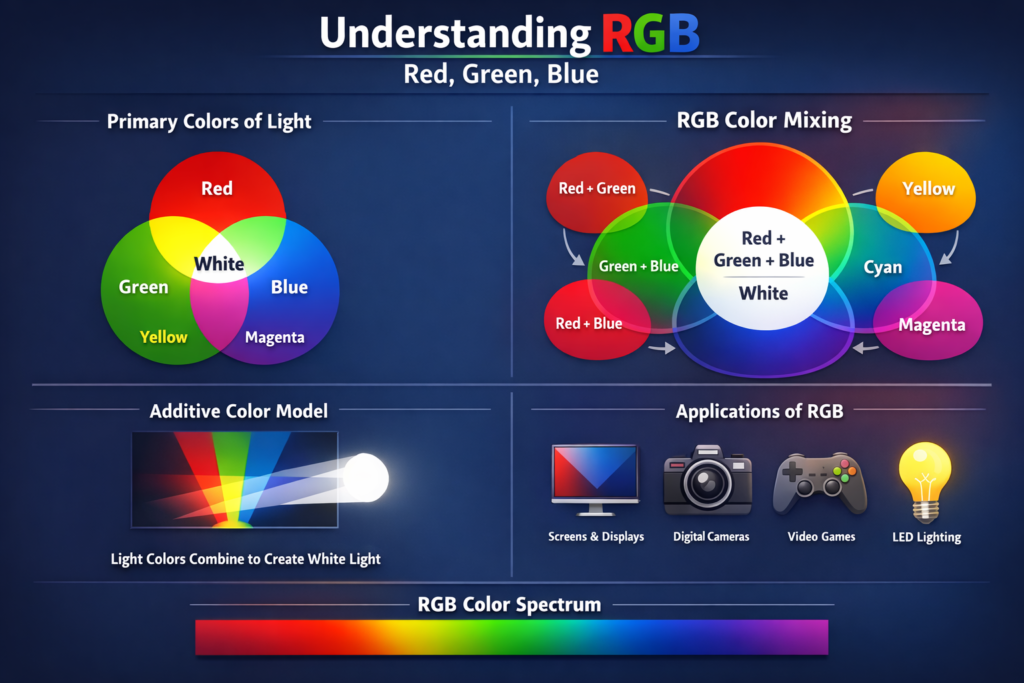
RGB (Red, Green, Blue)
Tech Terms Daily – RGB (Red, Green, Blue)
Category — GRAPHIC DESIGN
By the WebSmarter.com Tech Tips Talk TV editorial team
1 | Why Today’s Word Matters
Every image you see on a screen—whether it’s a smartphone, laptop, TV, or digital billboard—is built from a combination of three primary colors: Red, Green, and Blue. These aren’t just artistic choices—they’re the foundational building blocks of how digital devices create and display color.
For graphic designers, marketers, and content creators, understanding RGB is crucial. Using the wrong color mode can result in visuals that look vibrant on your monitor but dull, distorted, or completely different when viewed elsewhere. In the fast-paced digital world of 2025, where visuals are often the first touchpoint between brand and customer, getting color right is directly tied to brand consistency, professionalism, and engagement.
Whether you’re designing a logo for your website, creating social media ads, or prepping images for an online store, RGB knowledge ensures your designs appear exactly as intended—keeping your brand visuals crisp, accurate, and impactful.
2 | Definition in 30 Seconds
RGB (Red, Green, Blue) in Graphic Design:
A color model used for digital displays where colors are created by combining varying intensities of red, green, and blue light. Each color channel can range from 0 (no intensity) to 255 (full intensity), producing over 16 million possible color combinations.
It answers four critical questions:
- How are colors created on digital screens?
- Why do designs look different on a screen versus in print?
- How do I choose the correct color settings for my project?
- How can I ensure brand color accuracy across devices?
Think of RGB as the digital language of color—without speaking it fluently, your designs may lose their visual impact online.
3 | Why RGB Is Critical for Graphic Design
| Without RGB Knowledge | With RGB Knowledge |
| Colors appear inconsistent across devices | Consistent color reproduction on screens |
| Incorrect color settings for web projects | Accurate, vibrant digital visuals |
| Brand colors lose vibrancy online | Brand identity stays strong across media |
| Difficulty collaborating with developers | Smooth handoff between design and coding |
| Poor customer perception of design quality | Professional, polished digital presence |
4 | How RGB Works in Practice
- Additive Color Model – RGB is based on adding light to create colors. When red, green, and blue light overlap at full intensity, the result is pure white. When all are at zero, you get black.
- Color Channels – Each of the three channels (R, G, B) has a value between 0 and 255, meaning (255, 0, 0) is pure red, (0, 255, 0) is pure green, and (0, 0, 255) is pure blue.
- Hex Codes & Digital Design – Web and app design often use hexadecimal (hex) codes (e.g., #FF0000 for red) to represent RGB values in a compact format.
- Device Dependency – The way RGB values display can vary slightly between devices due to screen calibration, so testing on multiple devices is important.
5 | Five-Step Blueprint for Using RGB Effectively in Design
- Set Your Color Mode First
- When starting a digital project, set your software (e.g., Photoshop, Illustrator) to RGB mode to avoid conversion issues later.
- When starting a digital project, set your software (e.g., Photoshop, Illustrator) to RGB mode to avoid conversion issues later.
- Use Brand-Accurate Values
- Record exact RGB or hex codes for your brand colors to maintain consistency across all designs.
- Record exact RGB or hex codes for your brand colors to maintain consistency across all designs.
- Preview Across Devices
- Test designs on multiple screens to ensure colors appear as intended.
- Test designs on multiple screens to ensure colors appear as intended.
- Optimize for Accessibility
- Use contrast checkers to ensure RGB combinations meet accessibility standards for readability.
- Use contrast checkers to ensure RGB combinations meet accessibility standards for readability.
- Export Correctly
- Save images in formats that support RGB (e.g., PNG, JPEG, SVG) when designing for digital use.
- Save images in formats that support RGB (e.g., PNG, JPEG, SVG) when designing for digital use.
6 | Common Mistakes (and How to Fix Them)
| Mistake | Negative Effect | Quick Fix |
| Designing in CMYK for digital projects | Colors look dull or inaccurate on screens | Always start in RGB mode for screen designs |
| Ignoring device calibration | Colors shift between devices | Test designs on multiple displays and calibrate monitors |
| Using random RGB values | Inconsistent brand presentation | Maintain a brand style guide with approved color codes |
| Overusing full intensity (255) on all channels | Colors look overly saturated or harsh | Use subtle variations and test against backgrounds |
| Forgetting accessibility standards | Text and visuals hard to read for some users | Use high-contrast RGB combinations for legibility |
7 | Advanced RGB Tactics for 2025
- Wide Gamut RGB (Adobe RGB, Display P3) – Use extended RGB color spaces for more vivid colors on modern high-resolution displays.
- Color Management Systems – Use ICC profiles to manage color consistency between design software and displays.
- Dynamic Color Palettes – Adapt RGB palettes for dark mode vs. light mode in UI/UX design.
- Color Psychology in RGB – Select RGB combinations that evoke specific emotions aligned with your brand message.
- Variable Color Testing – Use A/B testing in digital campaigns to measure performance of different RGB color schemes.
8 | Recommended Tool Stack
| Purpose | Tool / Service | Why It Rocks |
| Design Software | Adobe Photoshop, Illustrator | Industry-standard RGB design tools |
| Color Palette Management | Coolors, Adobe Color | Easy creation and testing of RGB palettes |
| Accessibility Testing | WebAIM Contrast Checker | Ensures colors meet WCAG standards |
| Screen Calibration | Datacolor Spyder, X-Rite i1Display | Maintains accurate RGB output on monitors |
| Web Development Integration | Figma, Sketch | Seamlessly passes RGB values to developers |
9 | Case Study: RGB Accuracy Drives Engagement
A WebSmarter.com e-commerce client noticed that their vibrant brand colors looked muted on product images in their online store.
Before:
- Designs were created in CMYK mode intended for print.
- RGB conversion during export caused unpredictable color shifts.
- Product images lacked the “pop” that made in-store displays appealing.
After WebSmarter’s RGB Optimization:
- All design files switched to RGB mode from the start.
- Exact RGB and hex values from the brand style guide implemented across web assets.
- Product photography color-corrected to match brand colors digitally.
Result:
- Product images appeared more vibrant and true-to-life online.
- Click-through rates on featured product ads increased by 22%.
- Customers commented positively about the “fresh look” of the online store.
10 | How WebSmarter.com Makes RGB Work for You
- Color Mode Setup – Configure your design tools for RGB-first workflows.
- Brand Color Definition – Create a digital color palette with exact RGB and hex codes.
- Cross-Device Testing – Ensure color accuracy on different screens and resolutions.
- Accessibility Integration – Select RGB combinations that are both beautiful and readable.
- Design-to-Development Handoff – Provide developers with precise RGB values for flawless implementation.
11 | Wrap-Up: RGB Is the Digital Designer’s Color Language
Mastering RGB is essential for any designer working in digital media. It’s the foundation of how screens display color and a critical factor in ensuring your brand looks its best online.
With WebSmarter’s expertise, you can create RGB-optimized designs that are vibrant, accurate, accessible, and consistent across every platform—giving your digital presence the professional polish it deserves.
🚀 Book your RGB & Digital Design Optimization Session today and make every pixel count.



You must be logged in to post a comment.