

Plesk
Tech Terms Daily – Plesk
Category — WEB HOSTING
By the WebSmarter.com Tech Tips Talk TV editorial team
1 | Why Today’s Word Matters
When it comes to web hosting, managing your server, websites, email accounts, and security settings can be intimidating—especially if you’re not a systems administrator or developer. Yet, for businesses, freelancers, agencies, and entrepreneurs, having control over these aspects is essential for speed, security, and uptime.
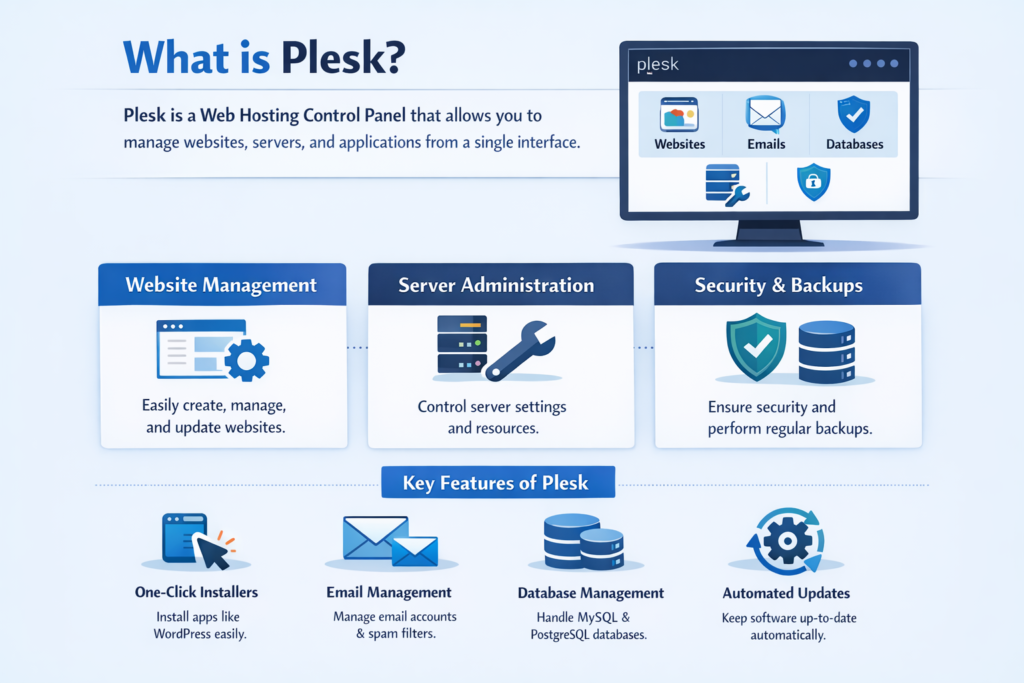
That’s where Plesk comes in. Plesk is one of the world’s most popular web hosting control panels, designed to simplify the complex tasks involved in running websites and servers. It provides a user-friendly interface to handle hosting accounts, domains, SSL certificates, backups, security tools, and more—all without having to memorize long terminal commands.
In 2025, with cloud hosting, VPS setups, and multi-site management becoming the norm, Plesk has become an industry-standard tool for anyone who wants flexibility and control without sacrificing ease of use. Whether you’re hosting your first website or managing hundreds for clients, Plesk offers the streamlined dashboard and automation features that keep your hosting environment secure, efficient, and scalable.
2 | Definition in 30 Seconds
Plesk (Web Hosting):
A web-based control panel that allows users to manage websites, hosting accounts, domains, email, databases, and server settings from a graphical interface instead of using command-line tools. Plesk supports Linux and Windows servers and integrates with popular CMS platforms, security tools, and cloud services.
It answers four critical hosting questions:
- How can I easily manage all my hosting services from one place?
- How do I handle website security, backups, and updates without deep technical skills?
- Can I efficiently host multiple sites for different clients or projects?
- What tools simplify integrating CMS platforms like WordPress or Joomla?
Think of Plesk as the cockpit of your web hosting—giving you the controls and indicators you need to fly your hosting environment smoothly and safely.
3 | Why Plesk Matters for Web Hosting
| Without Plesk | With Plesk |
| Complex server commands for simple tasks | Intuitive dashboard for all hosting needs |
| Manual updates and maintenance | Automated updates and security patches |
| Difficult multi-site management | Manage unlimited sites from one login |
| Higher risk of configuration errors | Guided setup wizards and templates |
| No unified integration for apps or security | Built-in extensions for CMS, SSL, backups |
4 | Key Features of Plesk
- Centralized Dashboard – Manage domains, files, databases, and email from a single panel.
- One-Click CMS Installers – Install and manage WordPress, Joomla, Drupal, and more with one click.
- Security Tools – Built-in SSL management, firewall configuration, and malware scanning.
- Email Hosting Management – Create and manage email accounts, forwarders, and spam filters.
- Database Tools – Direct access to phpMyAdmin and database backup features.
- Backup & Restore – Schedule automated backups and restore with a single click.
- Multi-Server Management – Control multiple servers from one Plesk instance.
- Extensive Extension Catalog – Add functionality with apps like Cloudflare, Git, SEO Toolkit, and more.
5 | Five-Step Blueprint for Getting the Most Out of Plesk
- Familiarize Yourself with the Dashboard
- Spend time exploring Plesk’s layout, including the left-hand navigation for domains, mail, and server tools.
- Spend time exploring Plesk’s layout, including the left-hand navigation for domains, mail, and server tools.
- Secure Your Hosting Environment
- Enable SSL/TLS, set up the Plesk firewall, and activate malware scanning extensions.
- Enable SSL/TLS, set up the Plesk firewall, and activate malware scanning extensions.
- Automate Routine Tasks
- Schedule backups, automatic updates for CMS platforms, and resource usage alerts.
- Schedule backups, automatic updates for CMS platforms, and resource usage alerts.
- Integrate Your Favorite Tools
- Connect Plesk with Git for deployment, Cloudflare for CDN and security, or Docker for app hosting.
- Connect Plesk with Git for deployment, Cloudflare for CDN and security, or Docker for app hosting.
- Monitor Performance & Usage
- Use Plesk’s analytics and resource monitoring to ensure your hosting stays optimized.
- Use Plesk’s analytics and resource monitoring to ensure your hosting stays optimized.
6 | Common Mistakes (and How to Fix Them)
| Mistake | Negative Effect | Quick Fix |
| Not enabling two-factor authentication | Increased risk of unauthorized access | Turn on 2FA in Plesk’s security settings |
| Ignoring software updates | Vulnerabilities and performance issues | Enable automatic updates for Plesk and hosted apps |
| Overlooking backup settings | Risk of data loss | Schedule daily or weekly automated backups |
| Not using the extension catalog | Missing out on productivity and security tools | Browse and install relevant Plesk extensions |
| Hosting too many sites without optimization | Server slowdown | Use caching, optimize databases, and monitor resource usage |
7 | Advanced Plesk Strategies for 2025
- WordPress Toolkit – Manage multiple WordPress sites with bulk updates, staging, cloning, and security hardening.
- Docker Integration – Deploy containerized applications directly from Plesk’s interface.
- Cloud Integration – Connect to AWS, Google Cloud, or Azure for hybrid hosting setups.
- Developer Mode – Use Git integration and command-line tools alongside the GUI for flexible workflows.
- SEO Toolkit – Analyze and improve site rankings without leaving Plesk.
8 | Recommended Tool Stack with Plesk
| Purpose | Extension / Tool | Why It Rocks |
| CMS Management | WordPress Toolkit | Streamlined WordPress management and security |
| Performance Optimization | Speed Kit | Improves load times with automatic caching |
| Security | Let’s Encrypt + ImmunifyAV | Free SSL and malware scanning |
| Backups | Acronis Backup | Cloud-based backup integration |
| Development | Git & Docker Support | Simplifies modern development workflows |
9 | Case Study: Plesk for a Growing Agency
A WebSmarter.com client, a digital marketing agency, was managing over 50 client websites across different servers.
Before:
- Separate logins for each hosting account.
- Manual WordPress updates and security patches.
- No centralized backup strategy.
After WebSmarter’s Plesk Implementation:
- All websites and servers managed through one Plesk interface.
- WordPress Toolkit automated updates and hardening for all client sites.
- Acronis Backup extension provided daily backups to the cloud.
- Performance monitoring alerts notified the team before issues impacted clients.
Result:
- Maintenance time reduced by 60%.
- Downtime incidents dropped to nearly zero.
- Client satisfaction improved thanks to faster updates and enhanced security.
10 | How WebSmarter.com Makes Plesk Turnkey
- Hosting Setup & Migration – Move your sites and servers into a Plesk-managed environment.
- Custom Configuration – Tailor Plesk settings to your business or agency needs.
- Security Hardening – Configure SSL, firewalls, and malware scanning for optimal safety.
- Training & Support – Provide your team with the knowledge to manage hosting like pros.
- Ongoing Maintenance – Monitor and optimize your Plesk environment for peak performance.
11 | Wrap-Up: Hosting Control Made Simple
Plesk is more than just a hosting control panel—it’s a comprehensive management platform that brings together security, automation, and scalability in one easy-to-use interface. Whether you manage one website or hundreds, Plesk reduces the complexity of hosting while giving you powerful tools to grow and protect your online presence.
With WebSmarter’s expertise, you can get the most out of Plesk—ensuring your hosting is secure, your workflows are efficient, and your websites perform at their best.
🚀 Book your Plesk Hosting Optimization Session today and take control of your hosting environment with confidence.


You must be logged in to post a comment.