

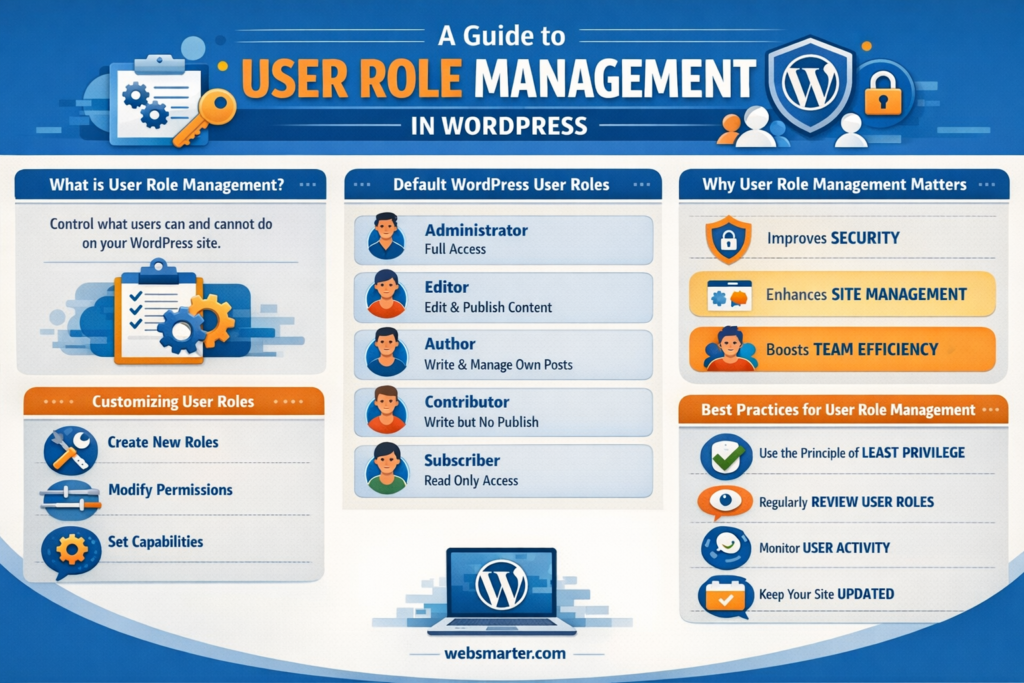
User Role Management
Tech Terms Daily – User Role Management
Category — WEBSITE MAINTENANCE
By the WebSmarter.com Tech Tips Talk TV editorial team
Why Today’s Word Matters
A mis-clicked permission can sink a site faster than a DDoS attack. One rogue intern given “Admin” rights can delete plug-ins, leak customer data, or publish an unapproved blog that turns into a Twitter storm. On the flip side, developers stuck with “Editor” access waste hours filing tickets for every minor code tweak. User Role Management (URM)—the discipline of assigning just-right capabilities to the right people at the right time—has become mission-critical as teams go hybrid, agencies share dashboards, and freelancers jump in for sprint projects. A robust URM system slashes security risk, smooths collaboration, and satisfies auditors. Neglect it, and you’ll juggle broken workflows, frantic password resets, and compliance fines that dwarf your hosting bill.
Definition in 30 Seconds
User Role Management is the structured process of creating, assigning, auditing, and retiring permission sets within a website’s CMS, server, or SaaS stack. A mature URM program includes:
- Granular roles (Admin, Developer, Editor, Analyst, Support, View-Only).
- Least-privilege principles—users get only the abilities essential to their jobs.
- Lifecycle governance—automatic role expiry, access reviews, off-boarding automations.
- Audit trails—who did what, when, and from where (IP/device).
Think of URM as the digital equivalent of key-card access in a skyscraper: the janitor enters at midnight, executives reach level 30, but nobody wanders into the server room unless their badge says so.
Where User Role Management Fits in the Maintenance Loop
| Maintenance Phase | URM Focus | Business Outcome | Stakeholder |
| Preventive | Role blueprints, MFA enforcement | Minimizes breach surface | Security Ops |
| Corrective | Revoke compromised credentials | Contain incidents fast | IT / DevOps |
| Adaptive | Grant temp roles for sprints, vendors | Agile collaboration | Project Leads |
| Perfective | Quarterly access reviews, HR sync | Clean, audit-ready roster | Compliance |
Treated as a living system, URM marries security hygiene with operational agility—two pillars of bullet-proof website maintenance.
Key Metrics That Matter
| Metric | Why It Counts | Health Benchmark* |
| Admin-to-User Ratio | Lower = less risk | ≤ 5 % of total accounts |
| Dormant Account Count | Ghost users invite exploits | Zero after 30 days idle |
| Role Creep Incidents | Unauthorized permission escalations | < 1 per quarter |
| MFA Adoption | Shields privileged roles | 100 % for Admin & Dev |
| Audit Closure Time | Speed to remediate findings | < 7 days per ticket |
*Derived from WebSmarter security audits across e-commerce, SaaS, and media sites (2024–2025).
Five Core Maintenance Tasks for Rock-Solid URM
- Blueprint Roles Before You Hire
Define capabilities once—then map new hires or vendors to the template. No last-minute guesswork. - Automate On- & Off-Boarding
Tie HR/contractor management tools (BambooHR, Deel) to your CMS via webhooks. When HR terminates a profile, roles vanish in minutes—not months. - Enforce MFA & IP Whitelists
Especially for Admin and Dev: hardware keys or authenticator apps plus office/VPN IP restrictions. - Quarterly Permission Recertification
Managers receive an auto-generated list of direct-report roles; click “approve” or “revoke.” Compliance box checked, risk reduced. - Immutable Audit Logs
Store logs in a write-once, S3-style bucket. PCI-DSS, SOC 2, and GDPR auditors will love you.
Common Pitfalls (and How to Dodge Them)
| Pitfall | Fallout | Rapid Fix |
| “Shared Admin” Login | Zero accountability, easy credential leak | Individual accounts only; disable generic logins |
| Zombie Contractors | Ex-vendors retain back-door access | Time-boxed roles + automatic expiry |
| One-Role-Fits-All | Editors can install plug-ins, devs can delete orders | Break roles by function, not seniority |
| MFA Exemptions | Busy execs skip 2FA, invite spear-phishing | Mandate MFA via SSO; no opt-outs |
| Manual Change Logs | Human error hides privilege escalations | Enable real-time logging plug-ins or SIEM feeds |
Five Actionable URM Upgrades This Quarter
- Role-Based Dashboards
Customize CMS UI so Editors see only content menus, Analysts see only reports—boosts focus and security. - Just-In-Time (JIT) Admin
Use tokens (Azure PIM, AWS IAM roles) to grant admin rights for 60 minutes, then auto-revert. - Passwordless Dev Environments
SSH certificates or GitHub Deploy Keys with short TTLs reduce credential sprawl. - Geo-Fence High-Risk Roles
Block Admin logins from countries where you don’t operate; alerts fire on anomalies. - Gamify Security Hygiene
Monthly leaderboard: teams with 0 dormant accounts earn coffee vouchers; friendly competition drives adoption.
Recommended Tool Stack
| Function | Tool | Stand-Out Feature |
| CMS Role Manager | WordPress User Role Editor, Craft CMS Permissions | Drag-n-drop capability matrix |
| SSO & MFA | Okta, Microsoft Entra ID | Policy-based step-up authentication |
| Access Reviews | StrongDM, AuditBoard | Automated certification workflows |
| Alerts & Logs | Datadog, Graylog | Role-change webhook triggers |
| Secrets Rotation | AWS Secrets Manager, HashiCorp Vault | Automatic key expiry & versioning |
How WebSmarter.com Tightens Your User Role Game
- Zero-Trust Assessment – We map every permission across CMS, database, and CDN, flagging toxic combos and dormant accounts.
- Role Blueprint Workshop – In a single afternoon, we co-design least-privilege templates aligned to RACI charts—ready to import.
- SSO & MFA Roll-Out – Our engineers integrate Okta or Entra ID, enforce hardware-key MFA, and migrate legacy logins without downtime.
- Continuous Monitoring Dashboard – Real-time Grafana or Looker tiles show Admin-to-User ratio, recent escalations, and audit-log heat maps.
- Quarterly “Access MOT” – We run automated reviews, deliver executive-friendly compliance reports, and tweak roles as org charts evolve.
Clients typically cut privileged accounts by 40 %, shrink audit prep time by 60 %, and report zero role-related incidents within six months.
Wrap-Up: Permissions as a Profit Multiplier
User Role Management isn’t a box-ticking IT chore—it’s an operational accelerator. By aligning privileges with actual job needs, you lower breach risk, speed up workflows, and sail through compliance audits. Pair least-privilege principles with automated onboarding, MFA, and real-time logging, and you’ve transformed your site’s back-end from Wild West to well-oiled machine.
Ready to bullet-proof your roles and reclaim admin sanity?
🚀 Book a 20-minute discovery call with WebSmarter.com, and our security engineers will turn chaotic permissions into a streamlined, zero-trust fortress—so you can focus on growth without lurking threats.
Join us tomorrow on Tech Tips Talk TV for another buzzword decoded—one term at a time.



You must be logged in to post a comment.