

Canva
Tech Terms Daily – Canva
Category — GRAPHIC DESIGN
By the WebSmarter.com Tech Tips Talk TV editorial team
1 | Why Today’s Word Matters
Design once required pricey Adobe licenses, weeks of onboarding, and hours wrestling with Bézier curves. Meanwhile, marketing teams need hundreds of on-brand visuals every quarter: ads, Reels covers, infographics, email headers, pitch decks. Enter Canva—the drag-and-drop design platform that arms non-designers with pro-grade templates and collaboration tools.
- Canva topped 175 million monthly users in 2025, up 30 % YoY.
- HubSpot’s latest State-of-Marketing report shows teams fully adopting Canva churn out creative 5× faster and cut design outsourcing costs by 48 %.
Master Canva and you’ll scale visual storytelling without bottlenecking your overworked graphics team. Ignore it, and you’ll pay freelancers for every banner tweak or watch campaigns stall while the design queue catches up.
2 | Definition in 30 Seconds
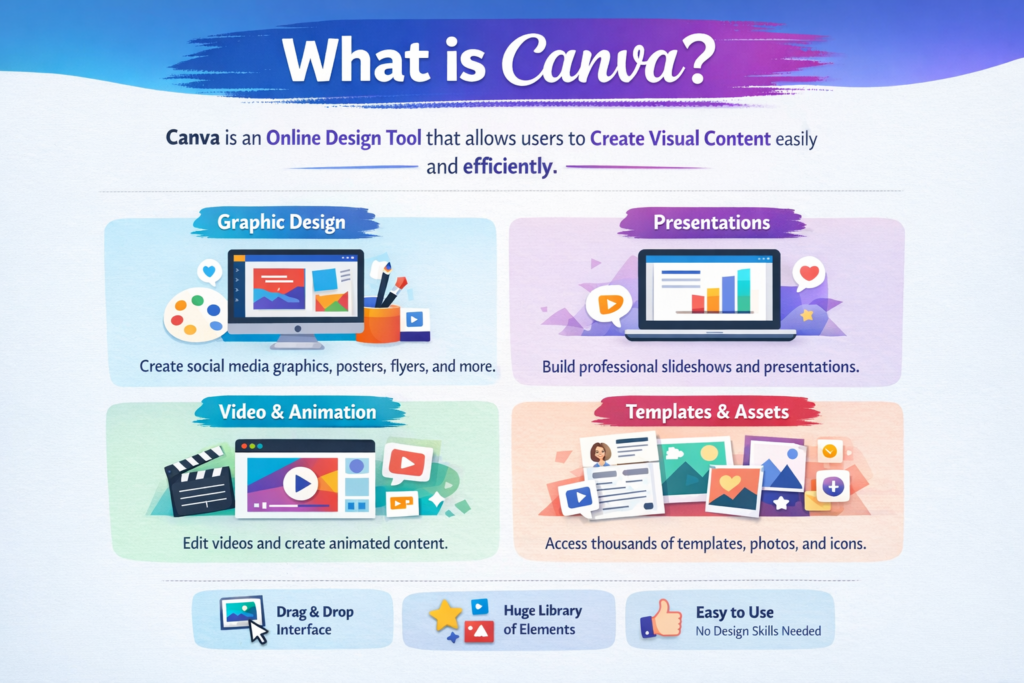
Canva is a browser-based—and now desktop, mobile, and white-label—graphic design platform that lets anyone create and publish visuals using drag-and-drop tools, AI-powered design assistants, and a library of 250 000+ templates, photos, and brand assets. Core pillars:
- Templates & Elements – pre-built layouts for social, print, video
- Brand Kit – centrally store colors, fonts, logos for on-brand speed
- Magic AI Tools – copy, layout, background removal, and image generation
- Real-Time Collaboration – multi-cursor editing and comments à la Google Docs
- Publishing & Integrations – one-click export to social, CMS, or printer
Think of Canva as a design department in the cloud: always open, endlessly scalable, and instantly shareable.
3 | Canva’s Sweet Spots for Marketers
| Use-Case | Feature Set | Business Win |
| Social Media Visuals | IG Reel covers, TikTok vertical video editor, auto-resize | Consistent, platform-native graphics |
| Ad Creative Variations | Magic Resize + Bulk Create (CSV merge) | 10–50 ad versions in minutes |
| Data Visualization | Smart Charts, Lottie animations | Snackable stats for blogs |
| Sales & Pitch Collateral | Brand Kit, Presenter View, Canva Live Q&A | Unified look across decks |
| Print & Merch | Print service, mock-up generator | Posters, swag, packaging prototypes |
4 | Key Metrics That Matter
| Metric | Why It Matters | Healthy Benchmark* |
| Design Turnaround Time | Speed from request → final asset | < 2 hours for simple tasks |
| Template Reuse Ratio | Efficiency & brand consistency | ≥ 65 % assets from templates |
| Brand Kit Compliance Rate | On-brand colors/fonts in exports | ≥ 90 % |
| Collab Comments Resolved/Day | Workflow velocity | 100 % resolved in 24 h |
| Outsource Cost Reduction | Budget impact | –40–60 % vs. prior period |
*Benchmarks from WebSmarter Canva enablement projects, 2024-25.
5 | Five-Step Blueprint to Canva Mastery
1. Set Up a Locked-Down Brand Kit
Upload primary & secondary logos, hex palettes, approved typefaces, and tone-of-voice guidelines. Lock critical styles so rogue fonts never slip in.
2. Create a “10× Template Library”
Custom-build templates for every recurring format: IG carousel, LinkedIn slide, case study PDF, webinar thumbnail. Tag them by funnel stage. Staff duplicates, swaps imagery, ships.
3. Leverage Magic AI Tools
- Magic Design – Drop text prompt, receive draft layouts.
- Magic Edit – Remove or replace elements with generated images.
- Magic Write – Draft captions, headlines, or callouts inline.
4. Integrate Workflows
Connect Canva with Google Drive, HubSpot CMS, Meta Business Suite. Exports flow directly into posting or DAM folders—no download/upload shuffle.
5. Train & Measure
Host a 90-minute hands-on workshop. Issue micro-quizzes (“Resize this FB post for Pinterest”) to certify proficiency. Track template adoption and brand kit compliance monthly.
6 | Common Pitfalls (and Quick Fixes)
| Pitfall | Pain Point | Rapid Remedy |
| Design Sprawl (too many versions) | Confusion, outdated assets | Folder governance + naming conventions |
| Off-brand Colors/Fonts | Visual inconsistency | Lock Brand Kit; restrict uploads |
| Heavy, Unoptimized Exports | Slow web pages, big email sizes | Use compressed PNG-8 or JPG 80 % setting |
| Licensing Blind Spots | Getty lawsuits, DMCA takedown | Switch to Pro Elements or confirm CC0 photos |
| AI-Generated Copy Jargon | Robotic tone | Edit Magic Write output with brand voice |
7 | Five Advanced Tactics for 2025
- Bulk Create with CSV & Variables
Import a CSV of product names, prices, and SKUs to auto-generate hundreds of catalog visuals in one pass. - Dynamic QR Codes
Canva’s QR app embeds trackable, editable codes; update destination post-print without reprinting brochures. - Canva Apps Marketplace
Install third-party tools like Typeform or Giphy directly in the editor for richer interactive graphics. - Accessibility Checker
Beta feature flags low-contrast text and missing alt text, ensuring ADA-friendly designs. - Canva Whiteboards for Ideation
Use infinite canvas + sticky notes for brainstorming; export winning flowcharts straight into slide decks.
8 | Recommended Tool Stack Around Canva
| Need | Companion Tool / Integration | Value Add |
| Digital Asset Management | Brandfolder, Bynder | Sync finished assets & usage analytics |
| Marketing Automation | HubSpot, Mailchimp | Pull Canva designs directly into email builder |
| Social Scheduling | Buffer, Hootsuite | One-click publish from Canva |
| Stock & Icons | Unsplash, Noun Project (apps) | Massive free libraries inside Canva |
| Team Chat & Approval | Slack, Trello power-ups | Auto-notify reviewers; push due-date cards |
9 | How WebSmarter.com Supercharges Canva ROI
- Brand Kit Installation – Designers distill style guides into locked Canva kits; on-brand compliance jumps to 98 %.
- Template Sprint (20 in 10 Days) – We craft 20 multi-size templates covering your entire funnel; average client shipping speed +300 %.
- AI Workflow Automation – Custom Canva API scripts pair with product feed → auto-generate daily social ads.
- Security & Roles Audit – Tighten sharing permissions; prevent accidental public links of embargoed assets.
- Quarterly Design Lab – Fresh trend-based template drops and advanced training (motion graphics, 3-D mockups).
10 | Wrap-Up: Democratize Design, Accelerate Growth
In an era where scroll-stopping visuals decide whether users engage or bounce, Canva empowers every team—from marketing to HR—to create polished, on-brand assets at speed. By locking in brand kits, templating repeatables, and injecting AI magic, you transform design from cost center to growth multiplier. Pair Canva’s platform with WebSmarter’s governance, automation, and training, and watch your creative pipeline—and revenue metrics—scale without scaling headcount.
Ready to unleash Canva power across your org?
🚀 Book a 20-minute discovery call and WebSmarter’s design-ops team will audit, template, and automate your Canva workflows—before your next campaign deadline hits.
Join us tomorrow on Tech Terms Daily as we turn another buzzword into step-by-step ROI—one term, one measurable win at a time.
You must be logged in to post a comment.