

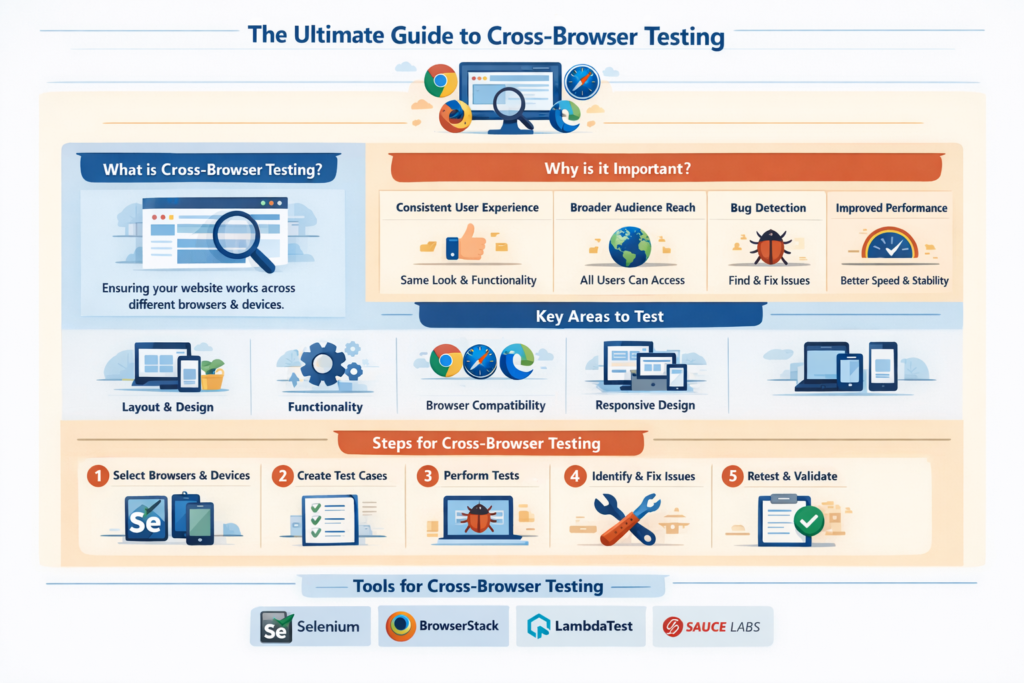
Cross-Browser Testing
Tech Terms Daily – Cross-Browser Testing
Category — WEBSITE MAINTENANCE
By the WebSmarter.com Tech Tips Talk TV editorial team
1 | Why Today’s Word Matters
Chrome may dominate desktop market share, but Safari, Edge, Firefox, Brave, Samsung, and a swarm of in-app webviews still serve billions of sessions every day. Add dark-mode CSS, reduced-motion preferences, and accessibility overlays and you’ve got a compatibility minefield.
- The 2024 Web Almanac found that 34 % of top-100k sites render critical layout shifts or JS errors in at least one secondary browser.
- Help-desk data shows that compatibility bugs triple bounce-rate and inflate support costs by up to 56 % when users see a broken checkout or misaligned menu.
Cross-Browser Testing (CBT) is therefore mission-critical maintenance: skip it and your marketing, SEO, and security investments evaporate the moment a visitor launches a different browser, OS, or device orientation.
2 | Definition in 30 Seconds
Cross-Browser Testing is the process of validating that every page, feature, and micro-interaction of a website behaves consistently across the combination of browsers, browser versions, operating systems, devices, and assistive-technology settings your audience uses. Key layers include:
- Functional parity – All critical actions (sign-up, add-to-cart) work.
- Visual integrity – Layout, fonts, and animations stay on-brand.
- Performance consistency – Acceptable load time and memory use.
- Accessibility compliance – Keyboard, screen-reader, and reduced-motion support.
Think of CBT as a universal translator: it makes sure your site “speaks” the same flawless experience no matter which browser “language” visitors choose.
3 | The Compatibility Matrix
| Dimension | Major Variants (2025) | Notes |
| Engines | Blink (Chrome/Edge/Opera), WebKit (Safari), Gecko (Firefox) | Rendering quirks & CSS support differ |
| OS & Devices | Windows 10/11, macOS Sonoma, iOS 18, Android 15, ChromeOS | Touch vs. mouse, system fonts, viewport units |
| Features | CSS Subgrid, Container Queries, WebAssembly SIMD, AVIF | Not uniformly shipped—polyfills may be needed |
| Assistive Tech | NVDA, VoiceOver, TalkBack | ARIA landmarks and focus management critical |
| User Preferences | Dark-mode, Reduced-motion, High-contrast | Needs appropriate media queries |
A modern CBT program prioritizes the combinations that cover ≥ 95 % of sessions while monitoring the long tail for critical flows.
4 | Key Metrics That Matter
| Metric | Why It Matters | Healthy Target* |
| Critical-Flow Pass Rate | % of top tasks that succeed across browsers | ≥ 99 % for top-5 browser/OS pairs |
| Visual Regression Count | Layout diffs per release | 0 high-severity, <5 minor |
| First Contentful Paint Delta | Performance parity across engines | ≤ 500 ms variance |
| Accessibility Violations | Axe/Pa11y errors detected in non-Chrome engines | 0 blocker, <10 total per page |
| Browser-Specific Support Tickets | User-reported bugs by browser | Trending ↓ quarter-over-quarter |
*Benchmarks from WebSmarter maintenance engagements, 2024-2025.
5 | Five-Step Blueprint to Bullet-Proof Cross-Browser Testing
1. Build a Data-Driven Browser Matrix
Pull analytics for the last 90 days: break down sessions by browser, version, OS, device type, and accessibility prefs. Update quarterly.
2. Automate the Baseline Suite
- Unit & Component Tests – Jest/Vitest + Testing Library.
- End-to-End – Playwright or Cypress configured with multiple browser contexts.
- Visual Regression – Percy, Chromatic, or Playwright’s screenshot diff for critical pages.
3. Layer in Cloud Device Grids
Integrate BrowserStack, Sauce Labs, or LambdaTest in CI to spin up real iOS/Safari, Samsung Internet, older Edge (WebView2) environments.
4. Add Accessibility & Performance Gates
Embed Axe-core checks in CI; fail builds on critical a11y errors. Collect Core Web Vitals across browsers; alert if LCP/CLS/INP regression > 10 %.
5. Establish a Rapid Triage Workflow
Tag every bug report with browser metadata (Sentry, BugSnag). Assign owners, severity, and SLA: critical flow breakage fixed within 24 h.
6 | Common Pitfalls (and Quick Fixes)
| Pitfall | Consequence | Quick Fix |
| Testing only in Chrome | Edge-case bugs in Safari/Firefox | At minimum test Blink + WebKit + Gecko |
| Polyfills loaded globally | Unnecessary bloat for modern browsers | Use conditional type=”module”/nomodule |
| Screenshot-only “pixel tests” | Hidden JS errors pass undetected | Pair visual and functional automation |
| Ignoring reduced-motion media | Accessibility complaints, vestibular issues | Add prefers-reduced-motion overrides |
| One-time QA after launch | Regressions slip in future sprints | Integrate CBT into every CI/CD build |
7 | Five Advanced Tactics for 2025
- Container-Query Fallback Builder
Use PostCSS + polyfill service to generate fallback layouts for browsers without container queries. - AI-Powered Visual Diff Noise Filtering
LLM classifies diffs as meaningful vs. rendering jitter, slashing false positives by 70 %. - Real-User Monitoring per Engine
Break down Core Web Vitals by browser in SpeedCurve; auto-open GitHub issues when a metric degrades in any engine. - Edge-Testing Canary Deployments
Ship new code to 1 % of Safari sessions via feature flag; roll back instantly on spike of JS errors. - Self-Healing Test Locators
Playwright auto-updates selectors when minor DOM changes occur, keeping suites stable during redesigns.
8 | Recommended Tool Stack
| Layer | Tool(s) | Highlight |
| Unit / Component | Jest, Vitest, React Testing Library | Fast local feedback |
| E2E & Multi-Browser | Playwright, Cypress Cloud | Parallel tests in Chromium, WebKit, Firefox |
| Device Grids | BrowserStack, Sauce Labs | Real mobile devices & legacy browsers |
| Visual Regression | Percy, Chromatic, Playwright Trace | Pixel-perfect diff with thresholds |
| Accessibility & Perf | Axe-core CI, Lighthouse-CI, SpeedCurve | Blockers fail builds |
| Error & Session Replay | Sentry, FullStory | Browser-tagged bug reproduction |
9 | How WebSmarter.com Harden Your Browser Compatibility
- Matrix & Coverage Audit – 72-hour analytics deep-dive outputs a prioritized test matrix and gap analysis.
- Automation Pipeline Roll-out – Our engineers wire Playwright + BrowserStack into your GitHub Actions; releases blocked on critical failures.
- Visual & A11y Regression Vault – Percy + Axe integration catches mis-alignments and WCAG violations before users do.
- Performance Guardrails – Cross-engine Web Vitals dashboards and Slack alerts ensure parity after every deploy.
- Continuous Maintenance Retainer – Quarterly matrix refresh, polyfill retirement, and emerging-engine testing (Arc, Orion, Samsung 18).
Clients see –78 % browser-specific support tickets and +22 % checkout completion rate on Safari within two quarters.
10 | Wrap-Up: One Web, Many Windows
Visitors judge your brand in milliseconds; a broken button in Safari or a misaligned hero in Firefox can end the relationship before it begins. Cross-Browser Testing is the maintenance discipline that preserves trust, revenue, and SEO edge as the browser landscape evolves. With WebSmarter’s data-driven matrix, automation pipelines, and proactive dashboards, compatibility moves from post-launch scramble to always-on advantage.
Ready to ship code that delights every browser?
🚀 Book a 20-minute discovery call and WebSmarter’s quality-engineering team will architect, automate, and manage a CBT program tailored to your tech stack—before your next release hits production.
Join us tomorrow on Tech Terms Daily as we break down another buzzword into a step-by-step growth playbook—one term, one measurable win at a time.



You must be logged in to post a comment.