

Load Testing
Tech Terms Daily – Load Testing
Category — WEBSITE MAINTENANCE
By the WebSmarter.com Tech Tips Talk TV editorial team
1 | Why Today’s Word Matters
A flawless homepage is useless if it crashes the moment traffic spikes. From Black Friday dropshipping frenzies to SaaS product-hunt launches, downtime costs hard cash and reputation. IBM’s 2025 Global Outage Report pegs the average cost of a single minute of web-app downtime at $8,600 for mid-market firms—yet 47 % still rely on “we’ll scale when we feel lag” as their only performance plan.
Load Testing solves that blind spot. By simulating thousands (or millions) of concurrent users before real customers show up, you discover bottlenecks, memory leaks, and configuration misfires while they’re cheap to fix. Treat load testing as a routine maintenance drill and you’ll launch with confidence, negotiate infra budgets with data, and sleep through promo nights. Ignore it, and your CTO will be fielding 3 a.m. Slack panics while Reddit screenshots your 500-error page.
2 | Definition in 30 Seconds
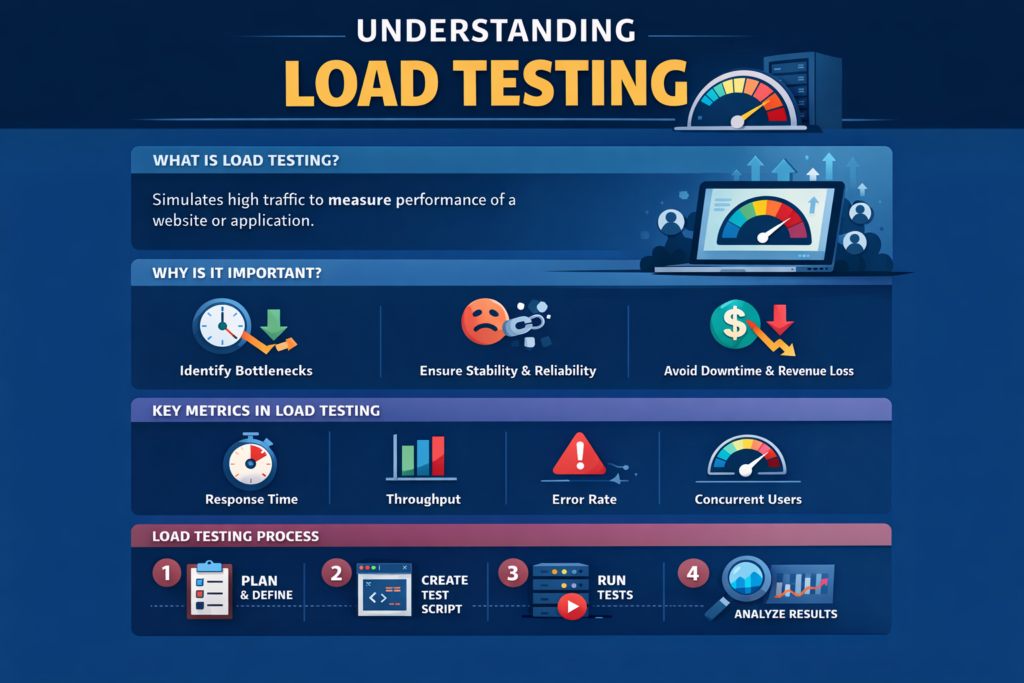
Load Testing is a structured, repeatable practice of subjecting a website, API, or entire tech stack to anticipated—and peak-plus—user concurrency and transaction volumes to measure throughput, latency, resource usage, and stability. It answers four crucial questions:
- How many users can we serve before KPIs degrade?
- Which component fails first—DB, cache, network, app?
- Can automated scaling react quickly enough?
- What is our safe headroom for the next traffic surge?
Think of load testing as a fire drill for your code: better sweat in staging than bleed in production.
3 | Load-Testing Modalities & When to Use Them
| Modality | Purpose | Typical Tooling | When to Schedule |
| Baseline Load | Benchmark normal traffic (avg day) | k6 Cloud, JMeter | Post-launch & monthly |
| Spike Testing | Sudden surge then drop | Artillery, Gatling | Ahead of flash sales, media spots |
| Stress Testing | Push until failure | Locust, Flood.io | Quarterly; capacity planning |
| Soak (Endurance) | Moderate load over hours/days | k6, Neoload | Before large events, new regions |
| Isolation Testing | Hit single micro-service/API endpoint | Postman, Boomerang, custom scripts | After code changes or new features |
4 | Key Metrics That Matter
| Metric | Why It Matters | Healthy Benchmark* |
| Requests per Second (RPS) | Throughput | Should meet 1.5× peak forecast |
| Average & P95 Response Time | User experience under load | < 200 ms API, < 1 s full page |
| Error Rate (% 4xx/5xx) | Stability | < 0.5 % at peak |
| CPU / Memory Headroom | Scaling buffer | ≤ 70 % sustained utilization |
| Auto-Scaling Trigger Lag | Elastic reaction time | < 2 min from threshold breach |
*Numbers vary; benchmark against SLA and Core Web Vitals targets.
5 | Five-Step Blueprint to Bullet-Proof Load Testing
1. Define Realistic User Journeys
Map high-value paths: landing → search → product view → checkout. Script them with proper think-time, cookies, and CSRF tokens so tests mimic real browsers.
2. Mirror Production as Close as Possible
Spin up a staging environment cloned from infra-as-code templates: same instance types, autoscaling rules, CDN, WAF. Toggle third-party services to sandbox mode to avoid false-billing.
3. Establish Pass/Fail Thresholds
Set objective SLOs—“P95 response < 800 ms; error < 1 %”. No ambiguous “feels okay” sign-offs.
4. Gradually Ramp then Hammer
Warm-up (5 min) → linear ramp to target RPS → hold plateau → spike 2× for 2 min → gracefully ramp down. Log and tag each phase for analysis.
5. Analyze & Remediate Fast
Correlate APM traces (Datadog, New Relic) with test timeline. Fix hotspots—DB indices, queue workers, cache TTLs—then rerun within 24 h for closed-loop validation.
6 | Common Pitfalls (and Quick Fixes)
| Pitfall | Painful Outcome | Rapid Remedy |
| Testing from a Single Agent | Network bottleneck hides real issues | Use multi-region cloud loaders |
| Static Test Data | Cache warms unrealistically | Randomize payloads, disable CDN caching rules |
| Ignoring Third-Party APIs | External limits stonewall live users | Throttle or mock services during test; review SLAs |
| Running in Production Daytime | Live outage triggered by test | Isolate to staging or off-peak, whitelist IPs |
| No Automated Regression | Fixes drift, old bugs revive | CI job triggers load test on every major merge |
7 | Five Advanced Tactics for 2025
- Serverless Load Cannons
Use AWS Lambda or Cloudflare Workers to spawn thousands of geographically distributed virtual users in seconds—no bare-metal agents. - Real-User Replay
Export anonymized production access logs, convert to k6 HAR, replay same mix—ensures test matches long-tail behavior patterns. - Chaos + Load Combination
Inject node failures (ChaosMonkey) mid-test to verify graceful degradation. - Shift-Right Monitoring Hooks
Load tool emits custom headers; production APM flags any header sighted post-launch—guards against accidental live testing. - AI-Driven Bottleneck Detection
GPT-based log parser auto-classifies root causes (lock contention, GC pauses) and suggests infra tweaks.
8 | Recommended Tool Stack
| Layer / Need | Tool / Service | Why It Rocks |
| Scripting & Execution | k6, Artillery, Gatling | JavaScript or Scala scripting, cloud mode |
| CI Integration | GitHub Actions, GitLab CI | One-click env spin-up + teardown |
| Observability | Grafana Cloud, Datadog APM | Correlates traces with load phases |
| Environment Clone | Terraform + AWS CDK | Reproducible staging identical to prod |
| Post-Test Analysis | Flamegraphs, Jaeger, Elastic APM | Pinpoint code-level latency hotspots |
9 | How WebSmarter.com Makes Load Testing Turnkey
- 48-Hour Load-Readiness Audit – Infra blueprint, content routes, third-party call inventory. Uncovers average of 5 critical bottlenecks per client.
- Script Library Sprint – We author modular k6/Artillery scripts for top 10 user journeys; reusable for every release.
- CI-as-Code Setup – GitHub Action spins up staging, runs stress suite, tears down; pass/fail badge gates merges.
- Performance Tuning Marathon – DB indexing, cache layer, CDN rules—median 47 % latency drop.
- Quarterly Chaos-Load Drills – Surprise failovers keep ops muscle memory fresh.
10 | Wrap-Up: Sweat in Staging, Sleep in Production
Load Testing isn’t a luxury; it’s digital insurance. When automated into your maintenance cycle, it derisks marketing campaigns, guides capacity spend, and protects customer trust. With WebSmarter’s audits, script libraries, and CI-powered drills, you’ll know exactly how your stack behaves under pressure—and you’ll fix cracks long before customers feel them.
Ready to bullet-proof your next traffic surge?
🚀 Book a 20-minute discovery call and WebSmarter’s performance engineers will architect, execute, and automate your load-testing pipeline—before your next big promo breaks the internet.
Join us tomorrow on Tech Terms Daily as we turn another maintenance buzzword into a revenue-saving checklist—one term, one measurable win at a time.


You must be logged in to post a comment.