

Maintenance Mode
Tech Terms Daily – Maintenance Mode
Category — WEBSITE MAINTENANCE
By the WebSmarter.com Tech Tips Talk TV editorial team
Why Today’s Word Matters
A single hour of unplanned downtime can cost small-to-mid-size businesses thousands in lost sales, ad spend, and eroded trust. Yet most websites still roll out updates live, leaving visitors to stumble into broken pages or cryptic error codes. Maintenance Mode—a temporary “under-construction” state that shields users while you patch, upgrade, or migrate—turns a potential PR nightmare into a polished brand moment. When executed well, it preserves SEO equity, collects fresh leads, and broadcasts professionalism. When ignored, it invites bounces, bad reviews, and frantic midnight support calls.
Definition in 30 Seconds
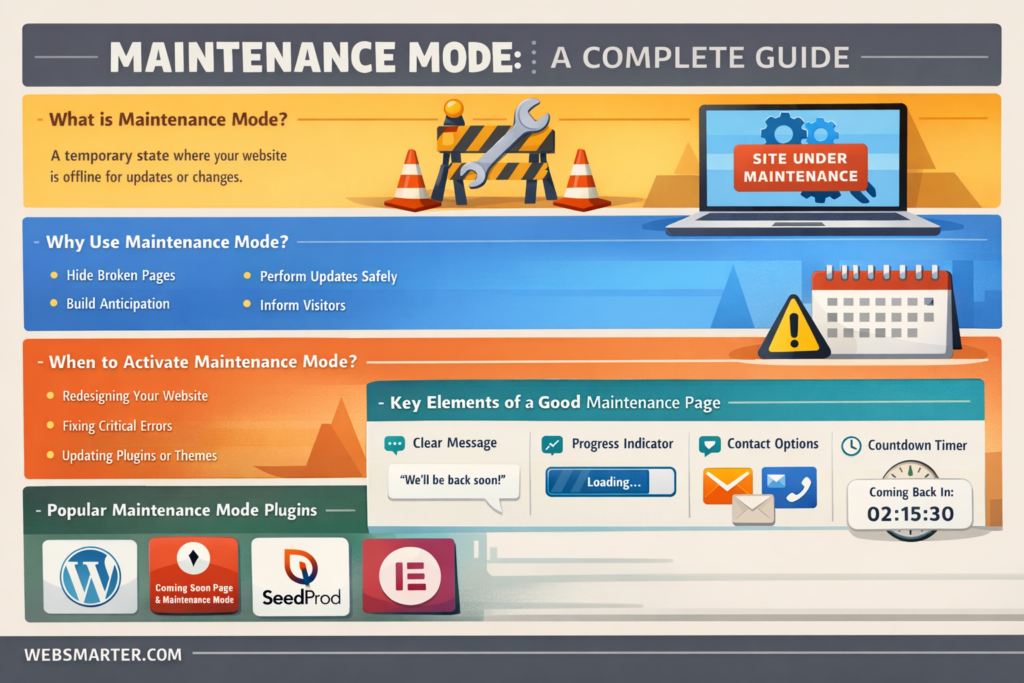
Maintenance Mode is a controlled state in which a website (or specific parts of it) is intentionally taken offline for updates, while serving a branded holding page or banner that:
- Informs visitors why the site is unavailable
- Provides an estimated time to return
- Offers alternative contact or buying options
- Returns the appropriate HTTP status (usually 503 with a “Retry-After” header) so search engines know the downtime is temporary
Think of it as the digital equivalent of placing velvet ropes and a “Back in 15 minutes” sign outside a storefront—customers stay informed, and Google doesn’t penalize you for vanishing.
Where Maintenance Mode Fits in the Website Lifecycle
| Phase | Typical Tasks | Risk Without Maintenance Mode | Benefit With Maintenance Mode |
| Launch Prep | Theme tweaks, content seeding | Search engines index half-built pages | Hide WIP, preload SEO metadata |
| Scheduled Updates | CMS core + plugin upgrades | UI glitches, security holes live | Safe sandbox for dev team |
| Server Migrations | DNS changes, SSL reissue | 404 errors, mixed-content warnings | Single branded status page |
| Security Patching | Hot-fix vulnerabilities | Hackers exploit open window | Locks front door while patching |
| A/B Overhauls | New design rollout | Split experience, cache conflicts | Seamless “big reveal” launch |
Bottom line: Maintenance Mode is the safety net that lets teams innovate without sacrificing uptime or reputation.
Anatomy of a High-Converting Maintenance Page
- Clear Headline – “We’re Performing Scheduled Maintenance”
- Brief Explanation – what’s happening and why it benefits users
- ETA Countdown – dynamic timer or specific date/time
- Brand Elements – logo, color palette, friendly tone
- Call to Action – email signup, promo code, status-page link
- Fallback Navigation – FAQ, resource library, social media buttons
- Proper HTTP 503 + Retry-After – tells bots to come back later
Treat it like a mini-landing page: persuasive copy, visual polish, friction-free lead capture.
Key Metrics to Monitor
| Metric | Why It Matters | Healthy Target |
| Planned vs Unplanned Downtime | Shows discipline in update cycles | 90 %+ of downtime should be planned |
| Average Downtime Duration | Impacts user trust & SEO | < 60 minutes/session |
| Bounce Rate During Maintenance | Measures message clarity | < 25 % if page is optimized |
| Opt-in Rate on Maintenance Page | Converts wait into pipeline | 3–5 % of visitors |
| Post-Update Error Logs | Validates rollback success | Zero critical errors |
Common Pitfalls (and Fast Fixes)
| Pitfall | Consequence | Fix |
| Using HTTP 200 | Google thinks new blank page = real content | Serve 503 + “Retry-After” |
| No ETA Provided | Visitors assume site is dead | Add countdown or specific clock time |
| “Coming Soon” Generic Page | Missed branding & lead gen | Embed logo, value prop, signup form |
| Forgetting Cart/Checkout | Abandoned high-intent users | Route to backup sales form or chat |
| Manual Toggle Only | Human error extends downtime | Automate via scripts or CI/CD pipeline |
Five Actionable Tips to Nail Maintenance Mode This Quarter
- Automate the Switch
Use a pre-deployment hook (GitHub Actions, GitLab CI, or WP-CLI) to trigger Maintenance Mode automatically the moment code hits staging—and lift it post-health-check. - Pre-Cache Critical Assets
Store hero image, CSS, and JS of the maintenance page on a CDN edge to guarantee sub-second load even while the origin is unreachable. - Personalize for Logged-In Users
Show a tailored message—“Hi Sarah, your account data is safe and will be back at 2 PM ET”—to reduce churn for membership or SaaS apps. - Leverage Status Page Integrations
Connect to Statuspage.io or UptimeRobot so the maintenance banner auto-pulls real-time incident updates and historical uptime stats. - Reward Patience
Offer a “We’re Back” coupon code or free resource in the follow-up email to everyone who opted in during downtime—turning inconvenience into delight and revenue.
Recommended Tool Stack
| Layer | Tools/Plugins | Highlights |
| CMS Plugin | WP Maintenance, SeedProd, Magento Maintenance | Drag-and-drop page builders |
| Static Hosts | Netlify “Redirects + Headers,” Vercel’s 503 functions | Instant edge rollbacks |
| DevOps | NGINX maintenance.html include, Apache RewriteCond %{REMOTE_ADDR} | IP whitelisting for devs |
| Monitoring | Pingdom, UptimeRobot, New Relic | Multi-location pings + SMS alerts |
| Communication | Statuspage.io, Slack webhooks, Mailchimp automation | Synchronized user updates |
How WebSmarter.com Turns Downtime into Prime-Time
At WebSmarter we treat Maintenance Mode as a marketing lane, not a speed bump:
- Zero-Downtime Deployment Blueprints – Our engineers map blue-green or canary strategies that slash visible downtime to seconds.
- Brand-Forward Page Design – In-house creatives craft pixel-perfect holding pages that match your voice and capture leads while the site sleeps.
- SEO Safeguard Audits – We verify proper headers, schema, and XML sitemap handling so Googlebot never mislabels your site.
- Integrated Comms Plan – Pre-scheduled social posts, email alerts, and chatbot replies keep customers in the loop automatically.
- Post-Launch QA Sprint – Our testers run a 40-point checklist before lifting Maintenance Mode, ensuring no hidden 404s, missing images, or security regressions.
Clients report up to 68 % fewer bounce-backs and 3× higher list growth during planned downtime once our playbook is in place.
Wrap-Up: Maintenance Mode as Competitive Advantage
In 2025’s always-on economy, the question isn’t if you’ll take your site offline—it’s how visibly you’ll do it. Treat Maintenance Mode as a polished brand experience: inform, reassure, engage. By combining crisp messaging with technical best practices, you safeguard SEO equity, soothe anxious customers, and even grow your list while the pixels are in flux.
Partner with WebSmarter.com, and every update—whether a security patch or full-scale redesign—becomes an opportunity to reinforce professionalism, harvest new leads, and launch faster with confidence.
Ready to Upgrade Without the Downtime Drama?
🚀 Book a 20-minute Maintenance Mode strategy call and discover how WebSmarter’s AI-driven deployment and design team can keep your site secure, your users informed, and your brand shining—even when the lights are off.
Stay tuned for tomorrow’s Tech Terms Daily, where we decode the next buzzword shaping digital success—one term at a time.


You must be logged in to post a comment.