

SEOquake
Tech Terms Daily – SEOquake
Category — SEARCH ENGINE OPTIMIZATION (SEO)
By the WebSmarter.com Tech Tips Talk TV editorial team
1 | Why Today’s Word Matters
Search Engine Optimization is a competitive landscape where decisions must be driven by data—not guesswork. To improve rankings, marketers and website owners need clear insights into how their pages perform, how competitors are structured, and what search engines see when they crawl a website. That’s where SEOquake comes into play.
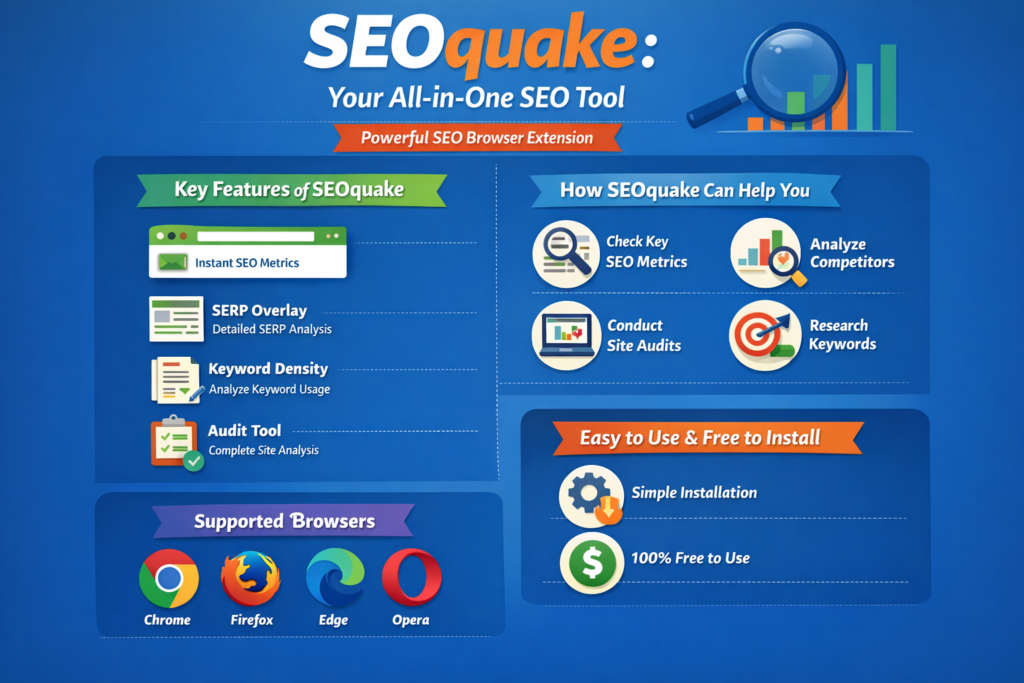
SEOquake is a browser extension designed to provide instant SEO metrics directly within your browser. With one click, you can analyze a webpage’s SEO health, examine keyword density, view backlink data, and compare competing pages in search results.
Why it matters now: In 2026, search engines rely on hundreds of ranking signals—from page structure and content quality to backlinks and technical performance. Having a tool that allows you to quickly evaluate these elements in real time makes it easier to diagnose issues, understand competitors, and make informed optimization decisions. SEOquake empowers marketers, SEO specialists, and business owners to see the hidden layers behind search engine rankings.
2 | Definition in 30 Seconds
SEOquake (Search Engine Optimization):
A browser-based SEO analysis tool that provides real-time metrics about webpages and search results, helping users evaluate page performance, keyword usage, backlink profiles, and technical SEO elements.
It answers four critical SEO questions:
- What SEO metrics define the performance of this webpage?
- How does this page compare to competitors in search results?
- What on-page elements might be affecting rankings?
- What opportunities exist to improve search visibility?
Think of SEOquake as an X-ray vision for websites—revealing the technical and content signals search engines evaluate behind the scenes.
3 | Why SEOquake Is Critical for SEO Work
| Without SEOquake | With SEOquake |
| SEO insights require multiple separate tools | Instant metrics appear directly in your browser |
| Difficult to compare competing pages quickly | Side-by-side SERP comparisons reveal strengths and weaknesses |
| Limited visibility into on-page SEO elements | Detailed analysis of titles, headings, and keyword usage |
| Time-consuming research process | Rapid diagnostics for faster decision-making |
| Harder to train teams on SEO evaluation | Simple visual indicators help non-experts understand SEO |
4 | Core Features of SEOquake
1. SERP Analysis
Displays metrics for every page in search engine results, helping you compare competitors instantly.
2. On-Page SEO Audit
Checks page structure elements like title tags, meta descriptions, headings, and internal links.
3. Keyword Density Analysis
Shows how often keywords appear within the page content.
4. Backlink Overview
Provides insight into external links pointing to the page.
5. Domain Metrics
Displays authority scores, indexed pages, and other domain-level statistics.
6. Exportable Reports
Users can download SEO data for deeper analysis or team collaboration.
5 | Five-Step Blueprint for Using SEOquake Effectively
1. Install the Extension
SEOquake works as a browser plugin (commonly used with Chrome, Firefox, or Edge).
2. Analyze Search Results Pages
Run a query in Google and review the SEOquake overlay to see metrics for each result.
3. Audit Individual Pages
Click the extension while viewing a page to run an instant SEO audit.
4. Compare Competitors
Review domain authority, backlinks, and content structure to see what top-ranking sites are doing.
5. Export Data for Strategy Planning
Use exported reports to identify patterns and refine your SEO roadmap.
6 | Common SEOquake Mistakes (and How to Fix Them)
| Mistake | Negative Effect | Quick Fix |
| Relying solely on one metric | Misinterpreting SEO performance | Use multiple metrics together |
| Ignoring search intent analysis | Optimizing for the wrong keywords | Pair SEOquake with keyword research |
| Over-focusing on keyword density | Content becomes unnatural | Prioritize readability and user value |
| Not comparing multiple competitors | Missed insights into ranking patterns | Analyze several top-ranking pages |
| Forgetting technical SEO factors | Hidden errors remain unresolved | Combine audits with site crawl tools |
7 | Advanced SEOquake Strategies for 2026
Competitive Gap Analysis
Use SERP metrics to identify ranking factors your competitors have that your site lacks.
Content Optimization
Analyze top-ranking pages’ keyword structure and headings to improve your own content hierarchy.
Rapid SERP Evaluation
Assess whether a keyword is worth targeting by reviewing competitor strength instantly.
Link Strategy Insights
Study backlink profiles of top-ranking domains to guide outreach campaigns.
SEO Training Tool
Use SEOquake as an educational resource to teach teams how search rankings work.
8 | Recommended Tool Stack for SEOquake Users
| Purpose | Tool | Why It Works Well |
| Keyword Research | SEMrush, Ahrefs | Discover high-value keywords |
| Technical SEO Audits | Screaming Frog | Deep crawl analysis |
| Performance Tracking | Google Search Console | Monitor rankings and impressions |
| Content Optimization | Surfer SEO | Improve page structure and keyword targeting |
| Analytics | Google Analytics 4 | Track traffic and user behavior |
SEOquake works best as a fast diagnostic tool, while these platforms provide deeper data for strategic planning.
9 | Case Study: Using SEOquake to Improve Rankings
A WebSmarter.com client in the professional services sector struggled to rank for competitive keywords despite publishing frequent blog content.
Before:
- Content lacked clear heading hierarchy.
- Competitors had stronger backlink profiles.
- Pages contained inconsistent keyword usage.
After WebSmarter’s SEOquake-driven analysis:
Step 1: Ran SERP analysis on top-ranking pages.
Step 2: Identified competitor pages with stronger title structures and more internal links.
Step 3: Reorganized page headings and optimized keyword placement.
Step 4: Built a backlink outreach strategy targeting authoritative industry blogs.
Results within four months:
- Organic traffic increased by 46%.
- Three key pages moved from page two to page one of Google results.
- Average time on page improved due to clearer content structure.
10 | How WebSmarter.com Makes SEOquake Insights Actionable
WebSmarter doesn’t just use SEO tools—we translate their data into results.
Our SEO services include:
SEO Diagnostic Audits
Identify ranking weaknesses and opportunities.
Competitor Intelligence Reports
Reveal what top competitors are doing differently.
Content Optimization Plans
Improve page structure, keyword usage, and readability.
Technical SEO Fixes
Resolve errors affecting search performance.
Continuous Monitoring
Track ranking improvements and refine strategies over time.
11 | Wrap-Up: Turning SEO Data Into Strategy
SEO tools like SEOquake give you a window into how search engines evaluate websites. They reveal patterns, highlight weaknesses, and help marketers understand why certain pages rank higher than others.
But tools alone don’t drive results—strategy does. By combining SEOquake insights with expert analysis and optimization techniques, businesses can transform raw data into meaningful improvements in visibility, traffic, and conversions.
🚀 Ready to uncover the hidden SEO opportunities in your website?
Book an SEO strategy session with WebSmarter.com and let’s turn data into rankings—and rankings into revenue.


You must be logged in to post a comment.