

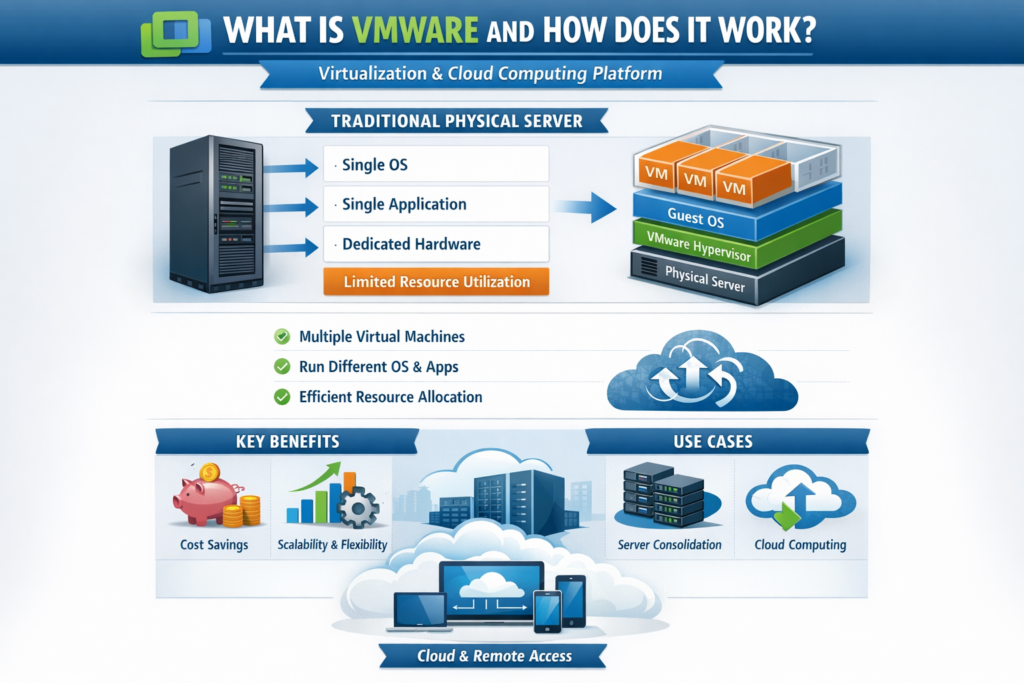
VMware
Tech Terms Daily – VMware
Category — WEB HOSTING
By the WebSmarter.com Tech Tips Talk TV editorial team
1 | Why Today’s Word Matters
Every refresh of your favorite site, every checkout on an e-commerce cart, and every micro-service talking to another behind the scenes depends on a robust hosting layer. Historically that meant racks of physical servers—slow to provision, expensive to scale, and painful to upgrade. VMware flipped that script two decades ago by mainstreaming virtualization: carving one physical machine into many isolated “virtual” servers.
Fast-forward to 2025 and VMware still underpins 80 % of Fortune 100 datacenter workloads, powers the private-cloud tiers of Amazon (VMware Cloud on AWS) and Microsoft (Azure VMware Solution), and—thanks to its vSphere stack—sits at the heart of thousands of hosting providers’ offerings. Businesses that virtualize with VMware enjoy:
- Up to 45 % hardware cost savings via higher utilization
- Minutes—not days—server provisioning, enabling CI/CD velocity
- Near-zero downtime live migrations for patching and hardware refreshes
Skip VMware (or a solid virtualization layer like it) and you’ll struggle with hardware sprawl, risky manual failovers, and hosting bills that balloon as traffic spikes.
2 | Definition in 30 Seconds
VMware is a suite of enterprise virtualization and cloud-infrastructure platforms that abstract compute, storage, and networking resources so multiple isolated workloads can run on the same physical hardware. Key building blocks:
- vSphere (ESXi + vCenter) — Hypervisor and centralized management
- vSAN — Software-defined storage pooling local disks into resilient datastores
- NSX — Micro-segmented, software-defined networking and security
- HCX / vMotion — Live migration and cross-cloud mobility
Think of VMware as the layer between raw metal and your apps, turning servers into a flexible, scalable, and highly available pool—like carving luxury condos out of a single skyscraper.
3 | VMware in the Web-Hosting Stack
| Layer | VMware Component(s) | Hosting Benefit |
| Compute | ESXi hypervisor, DRS (Distributed Resource Scheduler) | High density, auto load-balance |
| Storage | vSAN, vVols | Replicated, SSD-tiered, policy-driven storage |
| Networking & Security | NSX-T, Distributed Firewall | Tenant isolation, L4-L7 routing, micro-segmentation |
| Management & Automation | vCenter, vRealize Automation, Aria Ops | One-click templates, cost & health dashboards |
| Hybrid / Multi-Cloud | VMware Cloud on AWS, Azure VMware Solution | Burst or DR to public cloud without refactoring |
4 | Key Metrics That Matter
| Metric | Why It Matters | VMware-Powered Benchmark* |
| VM Density per Host | Direct CapEx efficiency | 40–70 VMs on dual-socket hosts |
| Average CPU Utilization | Hardware ROI | 65–75 % at peak with DRS |
| Provisioning Time to First Byte | Developer agility | 5–10 min via templates |
| Planned Downtime / Quarter | Maintenance impact on SLAs | < 10 min with live vMotion |
| Recovery Point Objective (RPO) | Data-loss tolerance in DR | ≤ 5 min with vSphere Replication |
*Figures from WebSmarter hosting audits, 2024-2025.
5 | Five-Step Blueprint to a Bullet-Proof VMware Hosting Environment
1. Design for N+1 Redundancy
Cluster at least three hosts; ensure one can fail without performance dips. Configure vSphere HA to auto-restart VMs on surviving hosts.
2. Template Everything
Capture golden-image VMs (OS + LAMP/LEMP stack, containers, or Kubernetes nodes). Developers or clients deploy via self-service portals—zero snowflake servers.
3. Enable DRS & Storage Policies
Let VMware shuffle VMs to balance hotspots and tier data onto SSD vs. HDD automatically. Performance spikes? Hosts rebalance themselves.
4. Isolate Tenants with NSX Micro-Segmentation
Define per-tenant or per-app firewalls at the virtual-NIC level. A compromised WordPress site can’t lateral-move into your billing database.
5. Automate Backups & DR
Pair vSphere Replication with Veeam or Rubrik. Replicate critical VMs to an off-site cluster or VMware Cloud on AWS; test failover quarterly.
6 | Common Pitfalls (and Rapid Fixes)
| Pitfall | Consequence | Remedy |
| Over-committing memory | Ballooning, swapping, sluggish sites | Right-size vCPU/GB and monitor active usage |
| Flat network for all tenants | Security & noisy-neighbor issues | Implement NSX or VLAN isolation |
| Snapshot sprawl | Bloated storage, slower performance | Enforce retention policies, auto-delete old snaps |
| Neglecting firmware + ESXi patches | Vulnerabilities & instability | Use Lifecycle Manager for rolling updates |
| Single vCenter instance | Management-plane SPOF | Deploy vCenter HA or linked mode |
7 | Five Advanced Tactics for 2025
- Tanzu + Kubernetes Behind the Scenes
Offer managed Kubernetes clusters on top of VMware Tanzu; tenants get container agility while you leverage the same hardware pool. - vSAN ESA (Express Storage Architecture)
All-flash NVMe-powered vSAN with compression + erasure coding hits >200 K IOPS/host—perfect for latency-sensitive SaaS. - Cloud Director Service
Expose multi-tenant, self-service portals (powered by VMware Cloud Director) so clients spin up, snapshot, and monitor VMs without opening tickets. - GPU Virtualization (vGPU)
Slice NVIDIA GPUs for AI inference hosting. GPU-as-a-Service becomes a new revenue stream with per-VM isolation. - Policy-Driven Green Computing
Aria Ops collects real-time power usage; DRS consolidates workloads at low traffic and powers down hosts—cutting energy costs 15–25 %.
8 | Recommended Tool Stack
| Need | Tool | Why It Rocks |
| Backup & DR | Veeam Backup & Replication, Rubrik | Agent-less VM backups, instant restore |
| Monitoring & Analytics | VMware Aria Operations (ex-vROps), Grafana | Capacity projections, alerting, show-back |
| Infrastructure-as-Code | Terraform + vSphere provider | Versioned, repeatable clusters |
| Security & Compliance | NSX Advanced Threat Protection, Carbon Black | East-west firewall + workload AV/EDR |
| Billing & Tenant Portals | VMware Cloud Director, WHMCS integration | Usage-based invoicing, self-service |
9 | How WebSmarter.com Turns VMware into a Hosting Powerhouse
- Architecture Assessment – 3-day discovery maps workloads to an optimized vSphere/vSAN cluster design; often yields 30 % host reduction.
- Zero-Downtime Migration – Live-migrate physical or Hyper-V servers into VMware with HCX; users notice nothing but faster sites.
- Self-Service Cloud Director Portal – In two weeks we brand and deploy a tenant portal with role-based access, chargeback, and one-click Kubernetes.
- 24/7 Proactive Ops – AI-driven Aria alerts route to our NOC; 95 % of incidents resolved before end-users call.
- Quarterly “Optimization MOT” – Firmware, ESXi, NSX patches + cost/performance tuning keep clusters evergreen.
Clients typically see -40 % hosting TCO and +18 % page-load speed within the first quarter.
10 | Wrap-Up: Virtualize Today, Scale Tomorrow
In web hosting, capacity spikes happen at midnight, hardware fails at noon, and security threats never sleep. VMware equips you with live migration, automated load-balancing, and software-defined everything—so you can meet SLA promises while shrinking costs. Layer on WebSmarter’s design, migration, and managed-service expertise, and your hosting platform evolves from a rack of servers into an on-demand cloud powerhouse.
Ready to virtualize with confidence?
🚀 Book a 20-minute discovery call and WebSmarter’s architects will craft, deploy, or optimize your VMware environment—before your next traffic surge hits.
Join us tomorrow on Tech Terms Daily as we decode another hosting buzzword into a step-by-step competitive advantage—one term, one measurable result at a time.


You must be logged in to post a comment.