

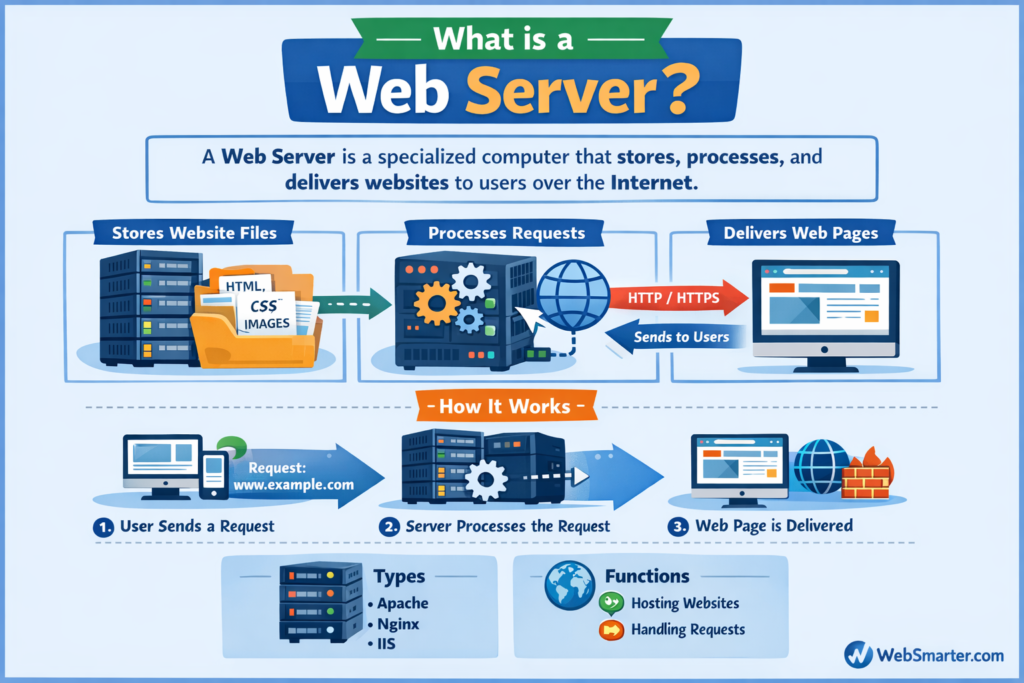
Web Server
Tech Terms Daily – Web Server
Category — Web Design & Development
By the WebSmarter.com Tech Tips Talk TV editorial team
1. Why Today’s Word Matters
Every tap, swipe, and voice command that loads a web page depends on computing power sitting—most likely—hundreds of miles away. That unseen engine is the web server. Choose the wrong one and your gorgeous design becomes a sluggish, insecure, bounce-inducing liability. Pick and fine-tune the right stack and you unlock sub-second Time to First Byte (TTFB), rock-solid uptime, and painless scalability. In a world where Google now treats performance as a ranking factor and users abandon a site after three seconds, understanding web servers isn’t just a sysadmin chore—it’s a revenue safeguard for designers, marketers, and founders alike.
2. Definition in 30 Seconds
A web server is hardware and software that receives HTTP/HTTPS requests from browsers, processes those requests (static assets or dynamic app logic), and sends back the corresponding web pages or API responses. Physically, it can be a single on-premise machine, a virtual private server (VPS), or an auto-scaling cloud cluster. Logically, it’s the software layer—Nginx, Apache, LiteSpeed, Microsoft IIS, or Node.js frameworks—listening on port 80/443, routing URLs, enforcing security, compressing payloads, and keeping logs.
3. Web-Server Architecture Cheat Sheet
| Layer | Function | Popular Options |
| Edge / CDN | Caches & shields origin | Cloudflare, Akamai, Fastly |
| Reverse Proxy | SSL termination, load balance | Nginx, HAProxy |
| Application Server | Runs code (PHP, Node, Python) | Apache, Gunicorn, Express |
| Static File Server | CSS/JS/images | Nginx, S3 + CloudFront |
| Operating System | Resource management | Ubuntu, AlmaLinux, Windows Server |
Rule of thumb: Separate “serving” (Nginx) and “processing” (application runtime) for easier scaling and security isolation.
4. Choosing the Right Web-Server Software
| Software | Strengths | Watch-outs |
| Nginx | Event-driven, low memory, perfect for static & proxy | Steeper learning curve for rewrites |
| Apache | Massive mod ecosystem, .htaccess flexibility | Heavier, threaded model can use more RAM |
| LiteSpeed | Drop-in Apache replacement, HTTP/3 native | License fees |
| IIS | Windows stack integration | Limited community modules, Windows licensing |
| Caddy | Automatic SSL, minimal config | Smaller ecosystem, newer |
Decision factors: traffic volume, tech stack (PHP vs. Node), budget, existing team expertise, control-panel requirements (cPanel often ties to Apache/LiteSpeed).
5. Step-by-Step Blueprint for a Production-Ready Web Server
Step 1 — Spin Up Infrastructure
- Cloud VM (AWS EC2, DigitalOcean) with at least 2 vCPUs, 4 GB RAM for small business sites.
- Harden SSH (key-based login, non-root user).
Step 2 — Install Web-Server Software
sudo apt update && sudo apt install nginx -y # Example for Ubuntu + Nginx
Step 3 — Secure with HTTPS
- Obtain free Let’s Encrypt TLS cert via Certbot.
- Automate 60-day renewal cron job.
- Force HTTPS with return 301 https://$host$request_uri; in Nginx server block.
Step 4 — Optimize Performance
- Enable Gzip/Brotli compression.
- Add cache-control headers for static assets.
- Use worker_processes auto; and tune worker_connections for expected concurrency.
Step 5 — Configure Virtual Hosts
- One domain per server block; isolate logs:
server {
server_name example.com www.example.com;
root /var/www/example/public;
access_log /var/log/nginx/example.access.log;
error_log /var/log/nginx/example.error.log warn;
}
Step 6 — Connect to Application Runtime
- PHP-FPM for WordPress/Laravel.
- PM2 for Node apps.
- Use Unix sockets for faster local communication.
Step 7 — Add a Firewall & WAF
- UFW (Ubuntu) to open only 22, 80, 443.
- Cloudflare or AWS WAF for DDoS protection and rate limiting.
Step 8 — Monitor & Log
- Install Netdata or Grafana Agent for CPU, RAM, disk, and Nginx metrics.
- Ship logs to ELK or Loki stack for alerting on 5xx spikes.
Step 9 — Implement Backups & Rollbacks
- Snapshot server nightly; automate DB dumps to S3.
- Use Ansible or Docker for infrastructure-as-code and quick restore.
Step 10 — Load-Test Before Go-Live
- wrk or k6 to simulate 500–1 000 RPS; ensure p95 latency < 300 ms.
- Scale vertically (bigger VM) or horizontally (add nodes behind load balancer).
6. Common Pitfalls & Fast Fixes
| Pitfall | Symptom | Fix |
| Default configs left unchanged | Slow TTFB, security headers missing | Harden + tune worker limits, add security headers |
| Bloated mod_php Apache setup | High RAM at low traffic | Switch to PHP-FPM or Nginx reverse proxy |
| Missing HTTP/2 or HTTP/3 | Waterfall delays, SEO penalties | Enable http2 or quic modules |
| Log files fill disk | Unexpected downtime | Rotate with logrotate; ship to external store |
| Mixed content (HTTP assets) | Browser warnings, SEO hits | Update asset URLs, add Content-Security-Policy |
7. Measuring Web-Server Success
| Metric | Goal | Tool |
| TTFB | ≤ 200 ms for main HTML | WebPageTest, Lighthouse |
| Uptime | ≥ 99.95 % | UptimeRobot, StatusCake |
| Error Rate (5xx) | < 0.1 % of requests | Grafana, Datadog |
| Peak RPS | Handle 2× normal traffic | k6, Loader.io |
| TLS Grade | A or higher | SSL Labs test |
8. Real-World Case Study
A SaaS platform on shared hosting faced 4-second loads and random 503 errors during product launches. WebSmarter migrated them to an Nginx reverse-proxy + Node cluster:
- Infrastructure-as-Code in Terraform; auto-scaling group on AWS.
- Enabled HTTP/3 and Brotli; switched DB connections to a read replica.
- Integrated Cloudflare WAF and image optimization.
Results (90 days):
- Median page load dropped from 3.8 s to 1.1 s.
- Uptime jumped to 99.99 % (one 5-minute outage in Q1).
- Organic traffic +22 % after Core Web Vitals improved.
9. How WebSmarter.com Supercharges Web-Server Performance
- Server Stack Audit – Deep dive into configs, headers, and resource bottlenecks.
- Optimization Sprint – Gzip/Brotli, HTTP/2, caching, and database pool tuning.
- Security Hardening – TLS 1.3, HSTS, WAF rules, real-time abuse detection.
- Scalability Blueprint – Container orchestration (Docker/Kubernetes) and auto-scaling.
- 24/7 Monitoring & Incident Response – Proactive alerts, monthly patching, SLA reports.
- Knowledge Transfer – Runbooks and workshops for your dev & marketing teams.
Clients typically see 30–60 % performance gains and dramatically reduced downtime inside a single quarter.
10. Key Takeaways
- A web server is the backbone delivering every byte of your site; speed, security, and scalability start here.
- Choose software based on workload; secure with TLS and firewalls; monitor relentlessly.
- Optimize worker processes, enable HTTP/2/3, compress assets, and plan for scale.
- Track TTFB, uptime, error rate, and TLS grades for ongoing health.
- WebSmarter.com provides audits, optimization, security hardening, and managed hosting for bulletproof performance.
Conclusion
Design dazzles, copy persuades—but without a tuned web server, none of it reaches users fast or safely enough to matter. Ready to transform your site’s invisible engine into a competitive edge? Schedule your complimentary Web-Server Performance Audit with WebSmarter.com and ensure every pixel loads at lightning speed—anywhere, anytime.



You must be logged in to post a comment.