

Preview Text
Tech Terms Daily – Preview Text
Category — EMAIL MARKETING
By the WebSmarter.com Tech Tips Talk TV editorial team
1 | Why Today’s Word Matters
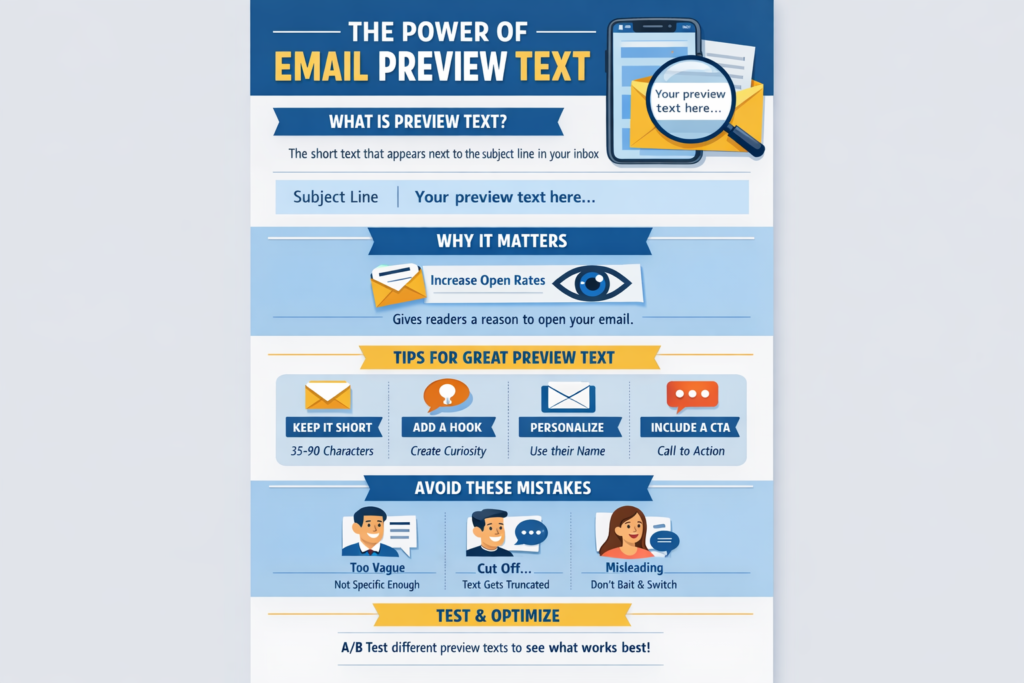
Inbox real estate is a knife-fight. Between newsletters, promotions, and automated receipts, the average professional now receives 121 emails every weekday—and triages most of them in under three seconds, often on a 6-inch phone screen. Your subject line gets the headline, but it’s the Preview Text (a.k.a. “pre-header text” or “snippet”) that functions as the subhead: the 30–90 characters Gmail, Apple Mail, Outlook, and mobile clients show right after—or below—your subject.
- Litmus’s 2025 State of Email Engagement shows campaigns with optimized preview text enjoy +26 % higher open rates and +14 % lift in click-through rates.
- Apple’s Mail Privacy Protection (MPP) artificially inflates “opens,” making true engagement cues like preview text more critical in persuading recipients to tap.
Treat preview text like free billboard space to amplify curiosity, urgency, or value. Ignore it and clients will fill the gap with random alt-text, unsubscribe URLs, or the dreaded “View Email in Browser,” draining hard-won attention.
2 | Definition in 30 Seconds
Preview Text is the short snippet—usually 40–140 characters—pulled from the top of an email’s HTML or a dedicated preheader tag that email clients display next to or underneath the subject line. Core attributes:
- Optional but Influential – If not supplied, clients auto-scrape the first live text in the email body.
- Hidden in the Body – Marketers commonly hide it with CSS (display:none;, font-size:0) so it previews without appearing in the message pane.
- Dynamic – Can be personalized with merge tags ( {first_name} , loyalty points).
Think of preview text as the movie trailer for your email—it sets the tone, teases the plot, and gets the audience to hit play.
3 | How Email Clients Render Preview Text
| Client (2025) | Visible Characters* | Truncation Style | Supports Emojis | Notes |
| Gmail Mobile | 30–55 | Ellipsis (…) | Yes | Subject + preview wrap on two lines |
| iOS Mail | 40–90 | Fade tail | Yes | Adjustable in Settings → Mail Preview |
| Outlook Desktop | 35–45 | Hard cut | Limited | Outlook 365 supports hidden preheader tag |
| Gmail Web | 100–140 | Ellipsis | Yes | Longer snippets on wide screens |
*Character counts depend on device orientation and font sizing.
4 | Key Metrics That Matter
| Metric | Why It Matters | Healthy Benchmark* |
| Open Rate Uplift vs. Control | Measures preview-text effectiveness | +10 % or higher |
| Subject–Preview Coherence Score | AI sentiment similarity; gauges clarity | ≥ 0.65 cosine similarity |
| Mobile Truncation Rate | % of sends where text cuts mid-word | < 20 % |
| Spam-Trigger Keyword Count | Compliance & deliverability | 0 (none) |
| Preheader Personalization Rate | % emails using dynamic tokens | ≥ 50 % for B2C lists |
*Derived from WebSmarter email-optimization projects, 2024–25.
5 | Five-Step Blueprint to High-Click Preview Text
1. Pair Like Copy & Caption
Your subject line is the hook; preview text should complete or contrast it.
Subject: “⏰ Last chance: 25 % off ends tonight”
Preview: “Still eyeing those noise-canceling earbuds? Grab them before 11:59 pm.”
2. Front-Load Value & CTA
Many clients cut after ~45 characters. Place the benefit or CTA by character 30:
“Earn double points—tap to activate in one click”
3. Personalize, but Protect Fallbacks
Merge tags boost relevance ( “Sarah, your cart waits” ), yet empty fields show “, ”. Always add fallback values: {first_name | there}.
4. A/B Test Micro-Variables
Experiment with:
- Emojis vs. no emoji
- Number vs. word (“20 %” vs. “twenty”)
- Scarcity (“Only 17 seats left”) vs. curiosity (“See the surprise speaker”)
5. Hide It Cleanly
Wrap preview text in a <span style=”display:none;…”> along with zero-width non-joiners to prevent clients like Outlook from revealing formatting artefacts.
6 | Common Pitfalls (and Quick Fixes)
| Pitfall | Inbox Result | Fix |
| Duplicate Subject & Preview | Wasted space; looks spammy | Differentiate copy; build narrative |
| Starts with “View in Browser” | Zero persuasive value | Add a hidden preheader block at email top |
| Excessive Special Characters | Garbled symbols on Outlook & older Android | Use Emojipedia-verified glyphs; test Litmus |
| Personalization Fail (“ , you…”) | Unprofessional appearance | Fallback values + pre-send merge validation |
| Overlength Truncation Mid-Emoji | “�” replacement character shown | Count bytes, not characters; maintain UTF-8 |
7 | Five Advanced Tactics for 2025
- AI Variants at Send-Time
ESPs like KlaviyoAI auto-generate preview variants per segment (discount seekers vs. VIPs) and choose the winning line via reinforcement learning. - Countdown Snippets
Live images embedded in preheader that update remaining sale time (“02:14:55 left”)—inbox FOMO skyrockets click-through. - Zero-Width A/B Framework
WebSmarter’s regex injection lets two preview versions hide in one send; client renders only first 150 px, enabling hidden multivariate tests without ESP split overhead. - Deliverability-Proof Scoring
Preflight API checks preview text against 2,000 spam-trigger words and domain blacklists—ensuring intrigue never trips filters. - Accessibility-First Preheaders
Screen-reader optimization with ARIA-label in header tag; ensures visually hidden preview text is read correctly in voice-over clients.
8 | Recommended Tool Stack
| Need | Tool/Service | Why It Rocks |
| Render Testing | Litmus, Email on Acid | 90+ client/device screenshot previews |
| AI Copy Generation | Jasper, Copy.ai, OpenAI GPT-4o | Rapid variant ideation |
| Spam & QA | GlockApps, Mail-Tester | Deliverability and blacklist checks |
| ESP Personalization | Klaviyo, HubSpot, Braze | Dynamic tags and send-time optimization |
| Analytics & BI | Looker Studio, Snowflake + Hightouch | Preheader performance dashboards |
9 | How WebSmarter.com Turns Characters into Clicks
- Preview Audit – We scan 90 days of sends, benchmark Subject–Preview synergy, spam keywords, and truncation points; deliver a grade A-F with sample rewrites.
- AI Copy Sprint – Copywriters + GPT-powered tools craft 20 preview/subject bundles tailored to personas; typical clients see +18 % unique opens in six weeks.
- Litmus Hands-Free Testing – Automation hooks into your ESP; renders & flags issues before every send—no screenshot grunt work.
- Deliverability Shield – Spam-trigger scanner integrates with Slack; blocks risky sends in real time.
- Quarterly Optimization Loop – WebSmarter analysts review variant data, retire low performers, and feed learnings into next quarter’s creative.
10 | Wrap-Up: Small Text, Big Impact
In email marketing, Preview Text is the unsung hero—30 to 90 characters that transform passive scanners into active clickers. Optimize it with a blend of personalization, front-loaded value, and rigorous testing, and you’ll boost opens, clicks, and ultimately revenue without adding a single extra pixel. Pair WebSmarter’s audits, AI-powered copy sprints, and automated QA, and your emails will stand out in even the most crowded inbox.
Ready to turn tiny snippets into measurable lifts?
🚀 Book a 20-minute discovery call and WebSmarter’s email strategists will benchmark, rewrite, and automate preview-text optimization—before your next newsletter drops.
Join us tomorrow on Tech Terms Daily as we decode another digital-marketing buzzword into a step-by-step growth playbook—one term, one tangible win at a time.

You must be logged in to post a comment.