

Social Media Calendar
Tech Terms Daily – Social Media Calendar
Category — SOCIAL MEDIA MARKETING
By the WebSmarter.com Tech Tips Talk TV editorial team
Why Today’s Word Matters
The average social-media user scrolls the length of the Eiffel Tower every day. Brands that show up sporadically—or post off-brand filler—get buried in the feed before they ever reach the third rivet. Meanwhile, generative-AI content, short-form video, and micro-community algorithms (Threads Channels, LinkedIn Collaborative Articles, TikTok Notes) all demand consistent, context-smart publishing. A rock-solid Social Media Calendar turns random posts into a rhythmic story: it aligns business goals, campaign themes, and channel algorithms so your content arrives at the exact moment your audience is primed to listen (and click). Build one, and you’ll lift reach, engagement, and ROI while slashing “What do we post today?” stress. Skip it, and you’ll spin in reactive mode—missing trends, duplicating work, and burning ad dollars to make up for organic gaps.
Definition in 30 Seconds
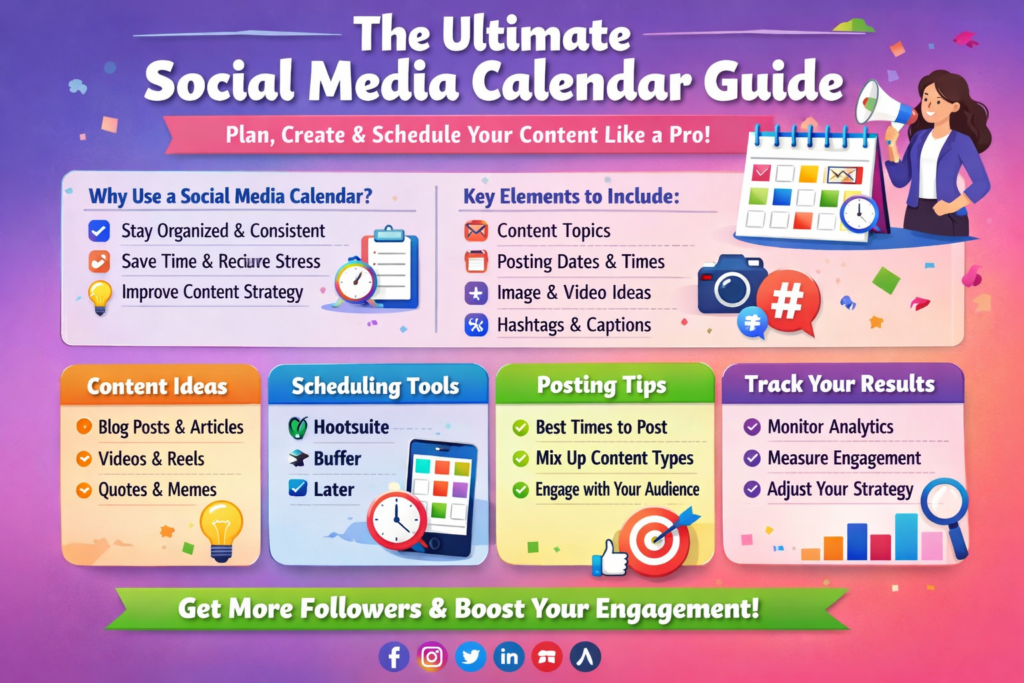
A Social Media Calendar is a forward-looking, centralized schedule that maps what will be published where, when, and why across all social platforms. The best calendars:
- Capture content pillars, campaign objectives, and key dates.
- Assign copy, creative, call-to-action, and owner for each post.
- Include approval status, asset links, and promotion budgets.
- Sync automatically with publishing tools and analytics dashboards.
Think of it as the editorial war room for your brand’s online persona—giving every stakeholder a crystal-clear view of upcoming narratives and resource needs.
Where a Social Media Calendar Fits in the Marketing Flywheel
| Flywheel Stage | Calendar Role | Business Payoff |
| Attract (awareness) | Schedule topical hooks, trendjacks, SEO snippets | Higher organic reach & discovery |
| Engage (consideration) | Plan educational threads, polls, webinars | Deeper dwell time & lead capture |
| Convert (decision) | Coordinate launch countdowns, promo codes | Spikes in click-through & sales |
| Delight (retention) | Slot in user-generated content, milestone shout-outs | Elevated loyalty & LTV |
| Amplify (advocacy) | Align employee-advocacy pushes, influencer collabs | Exponential share of voice |
A living calendar transforms isolated posts into a storyline that guides prospects from first glance to lifelong fan.
Key Metrics That Matter
| Metric | Why It Matters | Healthy Target* |
| Publishing Consistency | Posts delivered vs. planned | ≥ 95 % |
| Average Engagement Rate | Validates content resonance | 3–6 % (IG); 1–3 % (LI/Twitter) |
| Content Pillar Mix | Prevents one-note feeds | Max 35 % promo in any 30-day window |
| Time-to-Approve | Cuts bottlenecks | < 24 h for routine posts |
| Cross-Channel Repurpose Ratio | Reduces production cost | ≥ 3 platforms per core asset |
*Benchmarks vary by industry; use as directional guides.
Five-Step Calendar-Building Workflow
- Audit & Align
- Review past 90-day performance; map wins to business goals.
- Lock in quarterly themes (product launch, event, season).
- Review past 90-day performance; map wins to business goals.
- Draft Content Pillars
- Bucket ideas into 4-6 repeating themes (e.g., Tips, Behind-the-Scenes, Social Proof, Offers).
- Assign rough frequency targets (e.g., Tips every Tue/Thu).
- Bucket ideas into 4-6 repeating themes (e.g., Tips, Behind-the-Scenes, Social Proof, Offers).
- Plot Key Dates & Cadence
- Layer brand milestones, holidays, hashtag days, webinars.
- Balance platform-specific rhythms (Reels 3×/week, LinkedIn carousel 1×/week).
- Layer brand milestones, holidays, hashtag days, webinars.
- Create & Attach Assets
- Produce copy/creative in advance; store links in the calendar.
- Use modular templates so one hero graphic becomes carousel, Reel cover, story sticker.
- Produce copy/creative in advance; store links in the calendar.
- Schedule, Publish, Review
- Sync with a scheduler (Buffer, Sprout, Hootsuite) or native APIs.
- After each week, pull analytics and tag each post “keep, tweak, drop” for continuous improvement.
- Sync with a scheduler (Buffer, Sprout, Hootsuite) or native APIs.
Common Pitfalls (and Fast Fixes)
| Pitfall | Pain Point | Quick Fix |
| Platform-First Planning | Content silos, brand drift | Start with pillars, then adapt per channel |
| Approval Bottlenecks | Missed timeliness, stale memes | Set auto-approve tiers for low-risk posts |
| “Post & Ghost” | Lost engagement | Block daily reply windows into the calendar |
| No Crisis Buffer | Inflexible during breaking news | Reserve 10–15 % “flex slots” each month |
| Data-Free Iteration | Flat growth | Tag every post with objective & KPI, review monthly |
Five Actionable Tips to Super-Charge Your Calendar This Quarter
- Adopt a “Core-to-Micro” Strategy
Turn one flagship video or whitepaper into 12+ snackable posts—quotes, GIFs, polls—filling the calendar without doubling workload. - Inject AI-Assisted Variants
Use ChatGPT or Bard to spin headline/caption variants, then A/B test two per slot for algorithm-friendly freshness. - Bake in Community Prompts
Schedule weekly AMA thread or sticker question; user replies generate next week’s FAQ content—self-fueling calendar! - Color-Code Performance Signals
Apply traffic-light colors to past posts (green = top 30 %, yellow = average, red = underperform). At a glance, adjust pillar ratios. - Link Paid Boosters to Organic Peaks
Identify 48-hour windows after organic spikes; schedule micro-ad budgets to ride momentum instead of starting from zero.
Recommended Tool Stack
| Need | Tool(s) | Stand-Out Feature |
| Calendar Hub | Notion, Airtable, ClickUp | Drag-and-drop kanban + asset embeds |
| Scheduling & Analytics | Sprout Social, Agorapulse | Unified inbox + competitor benchmarks |
| AI Caption & Hashtag Gen | ChatGPT, Later Caption AI | Contextual tone sliders |
| Design & Resize | Canva Pro, Adobe Express | 1-click format swapping |
| Approval Workflow | Trello Power-Ups, Monday.com | Stakeholder checkpoints & reminders |
How WebSmarter.com Turbo-Charges Social-Media Calendars
At WebSmarter, we treat your calendar as a revenue engine, not a busywork spreadsheet:
- Data-Driven Kickoff – We audit 180 days of posts, map pillar performance, and forecast engagement lift scenarios.
- AI-Enhanced Content Ops – Our proprietary scripts auto-tag assets by theme, persona, and funnel stage, cutting planning hours by 60 %.
- Cross-Functional Playbooks – Designers, copywriters, and ad buyers work from one living calendar—no more “version 99_final-final.”
- Real-Time KPI Dashboards – Calendar items pipe into Looker Studio so executives see reach, clicks, and pipeline value in one glance.
- Quarterly “Storyline Sprints” – We workshop upcoming launches and trend cycles, then pre-build 4–6 weeks of evergreen + topical posts.
Clients see an average 38 % uplift in engagement and 52 % faster campaign launches after the first 90 days on our calendar framework.
Wrap-Up: From Chaos to Cadence
A Social Media Calendar isn’t just a planning tool—it’s a growth blueprint. It aligns your team, tames algorithm volatility, and ensures every post ladders up to real business outcomes. Pair it with data-driven retrospectives, agile workflows, and AI assistance, and you’ll turn scroll-by moments into revenue-driving relationships.
Ready to swap last-minute scrambling for strategic storytelling? Book a 20-minute discovery call and let WebSmarter’s Social Media team spin up a calendar that keeps your brand top-of-feed, top-of-mind, and top-of-market.
Join us tomorrow on Tech Terms Daily as we unpack another buzzword powering digital success—one term at a time.


You must be logged in to post a comment.